
Funnel Marketing
What Is a Landing Page? (And Why Not a Google Form?)
Published Updated
What is a landing page? A standalone page built for one goal, like capturing leads. See its key elements, 5 common types, and why it beats a Google Form.
Contents
A landing page is a standalone web page built around a single goal — capturing leads, taking event registrations or making a sale. Visitors "land" on it after clicking an ad, email, social post or search result, and because it strips away menus and unrelated links, it guides them toward one action. That focus is what separates a landing page from a homepage, and from a simple Google Form.
What Is a Landing Page?
In marketing, a landing page is any page designed for a specific campaign rather than general browsing. One-pagers and microsites are really landing pages under another name. They all share one purpose: cut through the noise, give visitors the information that matters, and point them to a clear call to action (CTA). That CTA is how the conversation with your customer begins — and how they enter the nurturing journey you've designed for them.
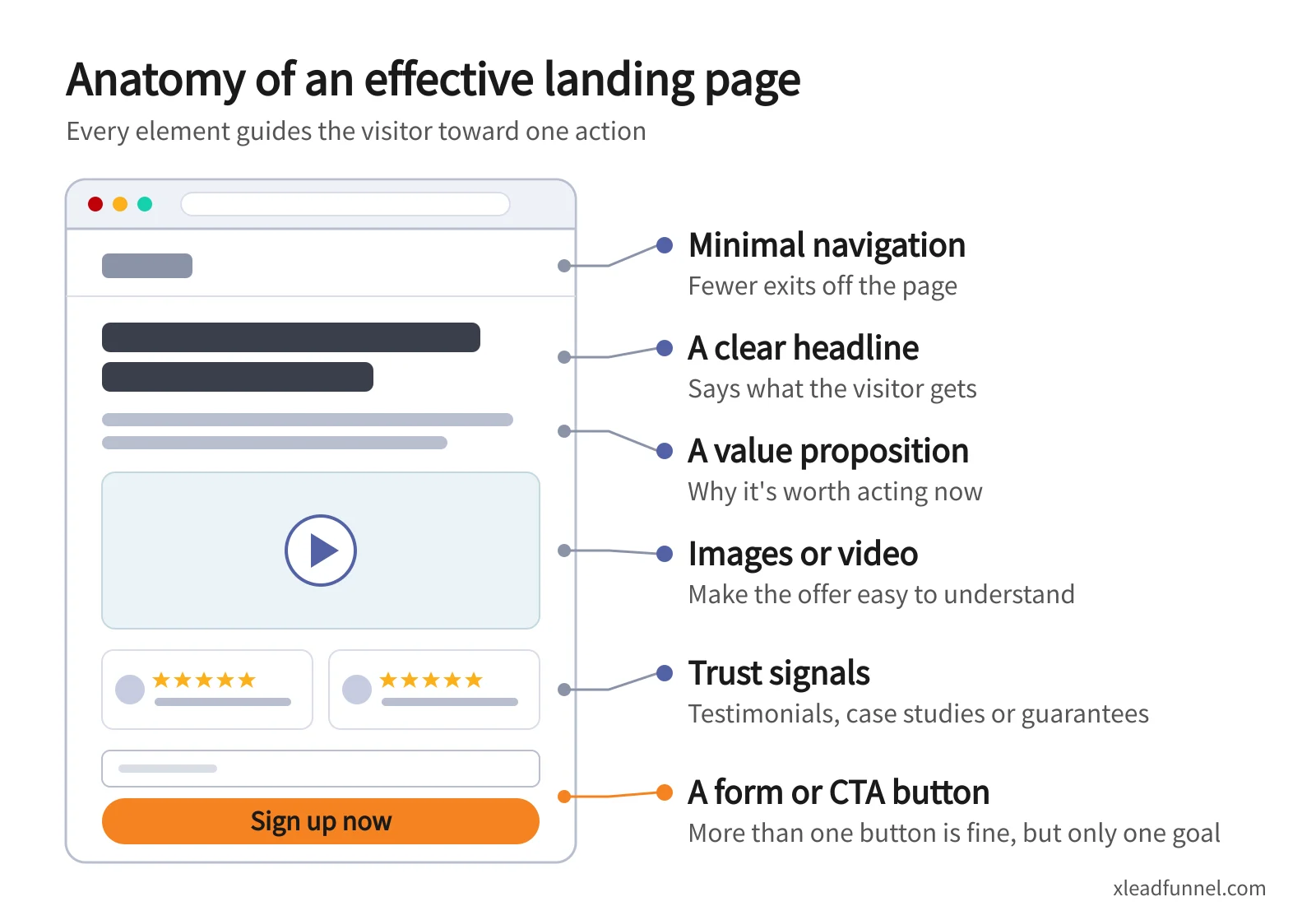
An effective landing page usually includes:
- A clear headline that says what the visitor gets
- A value proposition explaining why it's worth acting now
- Images or video that make the offer easy to understand
- Trust signals such as testimonials, case studies or guarantees
- A form or CTA button — there can be more than one button, but only one goal
- Minimal navigation, so there are fewer exits off the page
What Is a Landing Page Used For?
Landing pages are used wherever you want a specific action from a specific audience:
- Lead generation — trading a guide, checklist or free consultation for contact details
- Event registration — webinars, workshops and in-person events
- Bookings — letting customers pick a service and time slot
- Product launches and promotions — a limited-time offer with one clear path to buy
- Paid ad campaigns — sending ad clicks to a page that matches the ad's message, instead of a generic homepage
Landing Page vs. Homepage vs. Google Form
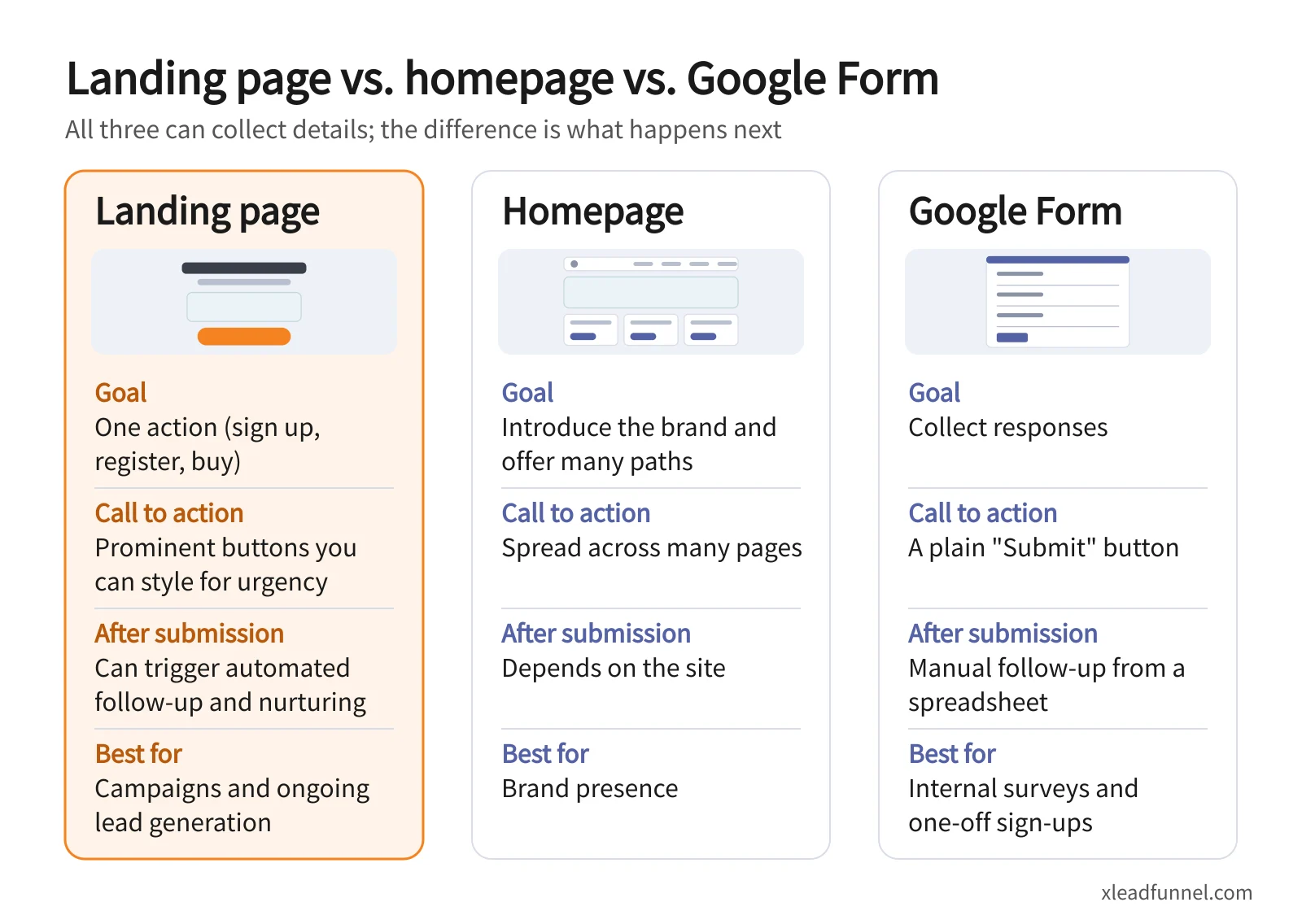
As we explain in "Landing Pages — How They Differ From Websites and Shopping Carts," a landing page has one crystal-clear goal that makes it easy to click and convert. If all you need is for visitors to fill in their details, a Google Form can do that too. The difference is what happens next.
5 Types of Landing Pages
- Lead generation landing page: Uses a form to collect contact details from visitors interested in your product or service, so you can follow up.
- Click-through landing page: A presentation page with no form. It shares useful information, then sends visitors on to another destination, such as an online store or course.
- Squeeze page: A short page with a bold headline and very little content, built to capture an email address and add it to your prospect list.
- Infomercial landing page: A story-driven page — long-form copy or a multi-step sequence — often used for higher-priced products or to communicate brand values, building enough trust that visitors buy or follow the brand.
- Viral landing page: Built for brand exposure, where the content is everything: a fresh idea, a mini game, or a striking video or image that visitors want to share for the social currency it gives them.
Why Not Just Use a Google Form?
Google Forms let visitors submit their details for an event, which covers the basic sign-up function of a lead generation or squeeze page. As a marketing tool, though, a Google Form has three clear limits:
- It doesn't persuade. The fixed layout lacks the design and rich content needed to win over hesitant visitors.
- The CTA is flat. A single "Submit" button can't be styled or positioned to create urgency.
- It stops at submission. Responses land in a spreadsheet you usually have to export and re-import into an email tool before you can follow up. Without marketing automation, it's hard to nurture those leads into sales.
To be fair, for internal feedback, a casual event sign-up, or any one-off collection that needs no marketing follow-up, a Google Form is perfectly adequate.

The Real Value: The Funnel Behind the Page
A landing page isn't only for sign-ups and sales. More importantly, it gives your business an automated marketer on standby 24 hours a day. Once someone signs up, the funnel behind the page starts following up automatically: the prospect keeps receiving useful content, and at the right moment a limited-time offer nudges them to buy. To see how that works end to end, read "What Is a Funnel?"
A Google Form is usually a one-off. A landing page is a marketing asset — a door that stays open for the long term, fed by ads, social media, SEO and partner links. And when you promote it, the goal is always clear: make it easy for visitors to get what they came for and deliver the value you promised.
Work backward from your end goal and you'll see how to design a value ladder: a path that leads customers to become high-value repeat buyers, and even loyal fans who spread the word for you.

How to Build a Landing Page With X Lead
- Start from a purpose-built template: Lead forms come in seven purposes — enquiries, booking, redemption offers, event sign-up, surveys, voting and a mini store. No code or designer needed; you can build one from an AI prompt.
- Share one link everywhere: Publishing gives you a dedicated link and QR code for LINE, Instagram, Facebook or print.
- Follow up automatically: Every submission is categorized and tagged on arrival, confirmations and reminders go out automatically, and your lists connect to automated messaging over EDM, SMS, LINE and WhatsApp.
Want a landing page that keeps working after the form is submitted? Sign up free and your first form can be live today.
FAQ
What is the difference between a landing page and a website?
A website is like a department store, offering lots of information and many paths. A landing page is like a single counter built for one purpose — claiming an offer or registering for an event — which makes it much easier for visitors to take action.
Can I use a Google Form as a landing page?
You can use it to collect information, but it's limited. A Google Form's layout and CTA aren't persuasive, and responses must be exported before you can follow up. If your goal is lead generation and conversion, use a landing page or lead form that follows up automatically.
What makes a good landing page?
A clear headline, one focused offer, visuals that explain it, trust signals such as testimonials, a short form with only the fields you need, and a CTA that stands out. Every element should support the single goal of the page.
Do I need a developer to build a landing page?
No. Most landing page and form tools provide templates — swap in your headline, content and fields, then publish. Some tools can even generate page content from an AI prompt.
Related articles
- Event Registration Form: Setup, Reminders & Check-in Guide
- Online Booking Form: What to Collect & How to Cut No-Shows
- From funnel form to follow-up: how multi-channel drip sequences actually work