
Founder's Mindset
[Must Read 2026] LINE Official Account Price Hike: Cut Costs
Published

LINE Official Account prices in Taiwan change on Nov 1, 2026. Compare old and new plan fees, see how messages are counted with worked examples, and get 7 ways to cut message costs.
Contents
- What changes for LINE Official Account in November 2026?
- How are LINE messages counted, and which ones are free?
- Worked examples: what do 2,000, 8,000 or 20,000 friends cost per month?
- Should you upgrade, downgrade or stay on your plan?
- 7 practical ways to cut LINE message costs
- Which messages should go by Email, SMS or LINE?
- How does X Lead Funnel route messages by tag?
- FAQ
LINE Official Account prices in Taiwan change on November 1, 2026: the Medium plan goes from NT$800 to NT$1,000 a month, the High plan from NT$1,200 to NT$1,400, the Light plan stays free, and every plan keeps the same number of free messages. For most small shops, though, the part that really drives the bill is not the monthly fee — it's the add-on messages that pile up when every broadcast goes to every friend. Based on LINE's official announcement (published September 1, 2026), this guide covers the old and new prices, how messages are counted, worked cost examples, and how segmentation and channel routing keep message costs down.
What changes for LINE Official Account in November 2026?
There are two changes: higher monthly fees for the Medium and High plans, and High-plan add-on messages move to just two price tiers. All amounts are in NT$, excluding tax:
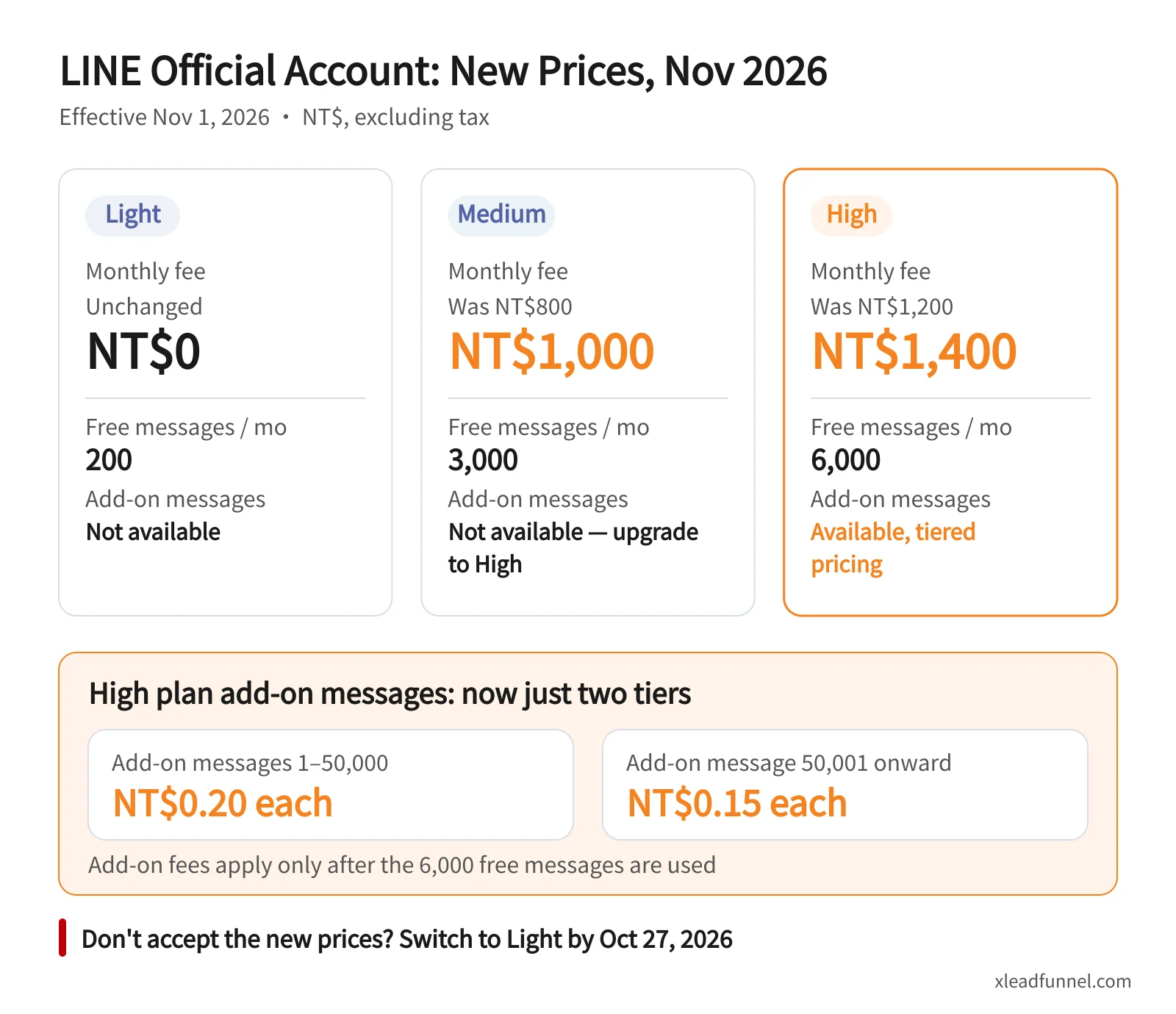
High-plan add-on messages used to follow a multi-step tiered scale "starting from NT$0.2 per message". From November, there are only two tiers:
Two details matter. First, add-on charges only start after the plan's 6,000 free messages are used up. Second, the pricing is progressive: only the messages beyond 50,000 get the lower rate, while the first 50,000 add-on messages are still NT$0.20 each. LINE also says Medium and High plans get a free upgrade to the OA PLUS platform, with modules such as auto-tagging and its shop tools.
How are LINE messages counted, and which ones are free?
LINE's formula is simple: chargeable messages = number of sends × number of target friends (see LINE's message billing FAQ). A few points people often get wrong:
- Target friends exclude people who blocked you. According to LINE's friend metrics guide, target friends are friends who have not blocked or deleted your account, so blockers don't add to your bill.
- One send can hold up to 3 message bubbles. In the desktop manager, a broadcast can contain up to 3 bubbles, and a rich message or a card-type message (up to 9 pages) counts as one bubble.
- These messages are free: the welcome message for new friends, one-to-one chats, auto-responses, AI auto-responses, and the Messaging API Reply API.
- These messages are charged: broadcasts, segmented messages, and messages pushed through the API.
So with 5,000 target friends and 4 broadcasts a month, you send 20,000 chargeable messages — whether each one has a single image or three bubbles.
Worked examples: what do 2,000, 8,000 or 20,000 friends cost per month?
These examples assume every friend is a target friend and you send 4 times a month. Each size compares "broadcast to everyone every time" with "one full broadcast plus three segmented sends" (new prices, excluding tax):
The pattern is clear: with the same 4 sends a month, turning 3 of them into segmented sends roughly halves the cost, and a shop with 2,000 friends can even drop from High back to Medium. For a precise estimate, LINE's new pricing calculator lets you enter your target friends and monthly broadcast count.
Should you upgrade, downgrade or stay on your plan?
Work out your monthly chargeable messages with the formula above, then compare:
- Up to 200 a month: the free Light plan is enough.
- 201 to 3,000 a month: choose Medium (NT$1,000). If you're on High but rarely use 3,000 messages, moving to Medium saves NT$400 a month.
- More than 3,000 a month: Medium has no add-ons, so you need High (from NT$1,400) — or use segmentation to bring your volume back under 3,000.
- Steadily 70,000+ a month: LINE says eligible accounts paying by credit card or LINE Pay can apply for a message-fee credit through the LINE Business Club programme.
Timing matters too:
- By October 27, 2026: if you don't accept the new prices, switch Medium or High to Light before this date; staying on after October 27 counts as accepting. Accounts on automatic credit card renewal are advised to add a secondary payment method by then.
- October 28 (from 8 am) to November 2, and November 24 (from 8 am) to November 25, 2026: during these system updates you can't buy, upgrade or downgrade plans, or change your message limit.
7 practical ways to cut LINE message costs
1. Segment by attributes and tags instead of broadcasting to everyone
LINE lets you split target friends by attributes such as gender, age and region, and Medium and High plans can build segments with OA PLUS auto-tagging. Send new arrivals only to people who bought something similar, and win-back offers only to regulars who haven't visited in 60 days. To decide who belongs where, see how to read customer temperature.
2. Combine content into one send
If you have a promotion, a new product and an event on the same day, don't send three times. One send can hold up to 3 bubbles and still counts as one message per friend.
3. Let free messages do more of the work
Welcome messages, auto-responses and one-to-one chats are free. Put your new-friend offer in the welcome message and set keyword auto-responses for opening hours, price lists and menus, so customers pull the information when they want it instead of you pushing it.
4. Send less often and watch your block count
People who block you no longer cost anything, but they also never see another message. If the block count in your Analytics jumps, you're sending too much or sending the wrong things — cut back on full broadcasts.
5. Move long content to Email and must-see reminders to SMS
Newsletters, guides and full event details suit Email. Appointment reminders, payment notices and anything that must be seen — or anyone who isn't a LINE friend — are better handled by SMS. The next section covers the routing rules.
6. Track how each segment responds
Log clicks and orders for every send. If a segment ignores several sends in a row, send to it less often or keep in touch through lower-cost Email.
7. Set a cap on add-on message spending
On the High plan you can set an add-on spending limit in the manager's billing section (see LINE's FAQ), so one accidental full broadcast can't blow up your bill.
Which messages should go by Email, SMS or LINE?
The rule is: look at the content and the audience first, then pick the channel — rather than sending everything through LINE out of habit.
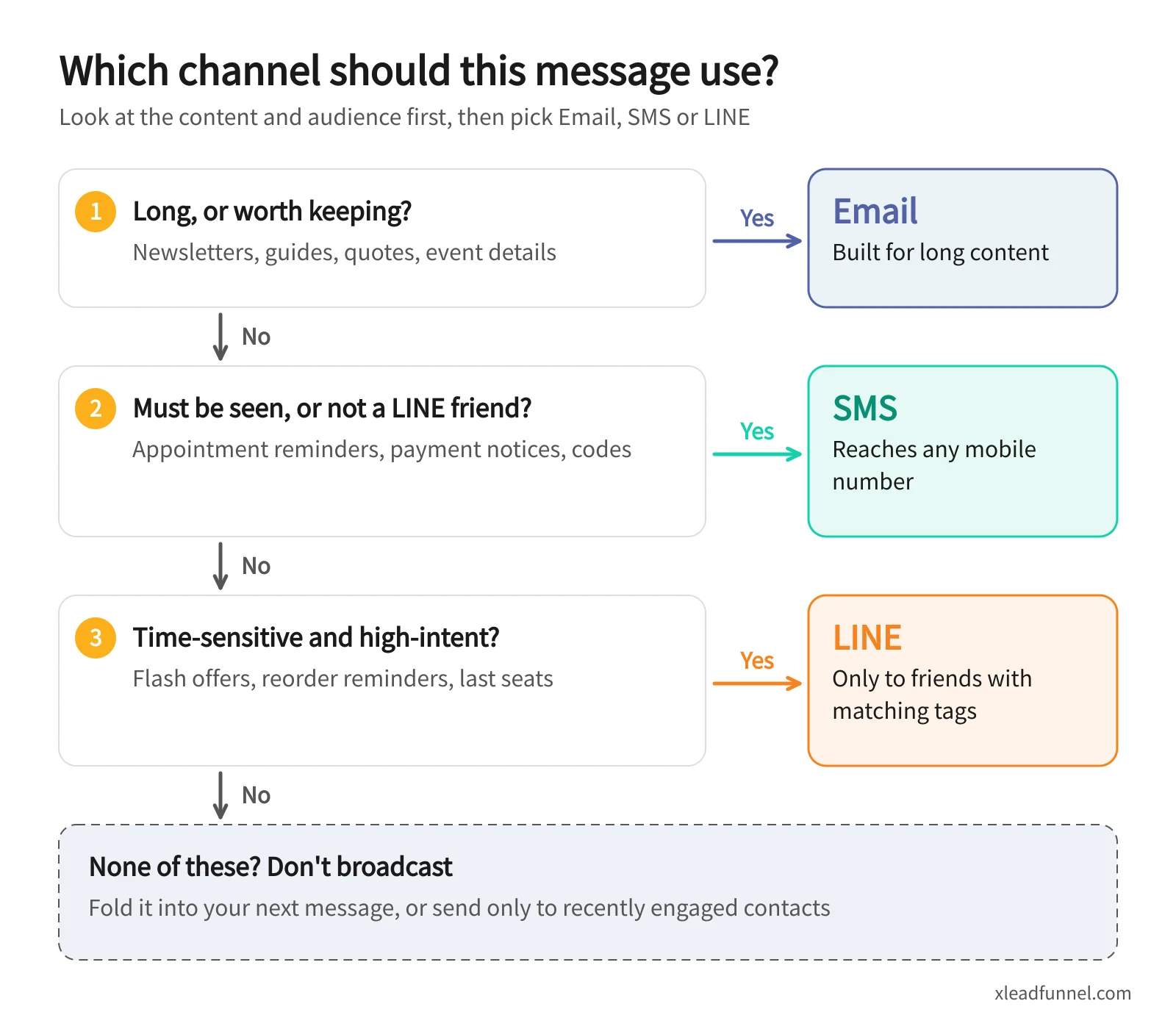
SMS is also charged per message, so keep it for short, must-deliver reminders rather than long content. If your customers are in Hong Kong, WhatsApp — not LINE — is usually the main messaging app, and the same rule applies: long content by Email, must-see reminders by SMS, high-intent messages by chat app.
How does X Lead Funnel route messages by tag?
Routing like this only works when each customer's data lives in one place and can be filtered by tags. X Lead Funnel tags contacts automatically by source, behaviour and form answers, and you decide by tag whether a message goes by EDM, SMS/MMS, LINE or WhatsApp:
- Lists and tags: audience groups and multi-condition search make it quick to pull segments such as "no repeat purchase in 60 days" or "attended a seminar".
- Automated follow-up: Drip sequences set what to send at each step and through which channel — see 5 drip follow-up sequence templates.
- Reports: open rates, click rates and each contact's activity history show which segments deserve LINE pushes.
On cost: form confirmation and reminder Emails are included, broadcast Email uses a top-up quota, and SMS, MMS, LINE and WhatsApp are charged in points — see the eCommunication rate card. LINE and WhatsApp require integration and are available on subscription plans only. Also note that, per LINE, messages pushed through the API are chargeable Official Account messages, so the point is always to save LINE for the messages that need it. See the full feature set in omnichannel communication automation.
FAQ
How much will a LINE Official Account cost per month from November 2026?
From November 1, 2026: Light is NT$0 (200 messages), Medium NT$1,000 (3,000 messages) and High NT$1,400 (6,000 messages), all excluding tax. Only High allows add-on messages: NT$0.20 each for the first 50,000 add-on messages in a month, then NT$0.15 each.
What happens when a Medium plan runs out of messages?
Neither Medium nor Light allows add-on messages. If you often run out, use segmentation to send fewer messages, or upgrade to High and buy add-ons as needed.
Do friends who blocked my account count toward message fees?
No. Messages are counted against target friends, and target friends are those who have not blocked or deleted your account.
Do auto-responses and one-to-one chats count as messages?
No. Welcome messages, one-to-one chats, auto-responses, AI auto-responses and the Messaging API Reply API are all free. Only broadcasts, segmented messages and API push messages are charged.
What should I do if I don't accept the new prices?
Before October 27, 2026, switch your Medium or High plan to Light in LINE Official Account Manager. If you keep using Medium or High after October 27, you are treated as accepting the new prices.
Related articles
- Why Personal Branding Matters So Much in the Gig Economy
- How to Choose Marketing Automation Tools for a Small Business
- Beyond Linktree: Explain Who You Are on One Page, and Keep the Client