
Founder's Mindset
How to Choose Marketing Automation Tools for a Small Business
Published

How small businesses in Taiwan and Hong Kong can choose marketing automation tools: the typical stack by job, published prices (Sept 2026), hidden integration costs and a 9-point checklist.
Contents
- What does marketing automation actually need to do?
- What does a typical small-business marketing stack in Taiwan look like?
- How much do common marketing tools cost?
- What are the hidden costs of a stitched-together stack?
- Multi-tool stack or all-in-one platform: which fits you?
- How do you choose? A 9-point checklist
- What does X Lead Funnel cover?
- FAQ
Marketing automation tools handle the repetitive work of capturing leads, organizing contacts, following up, closing sales and measuring results, so you don't have to do each step by hand. A typical small business in Taiwan builds this by stitching together Google Forms, a spreadsheet, a LINE Official Account, an email tool, an SMS platform and an integration tool. That's often five or more products for one funnel. It works, but every extra tool adds another bill, another connection that can break, and another copy of your customer data. This guide breaks the usual stack down by job, lists each tool's published pricing at the time of writing, and helps you decide what to consolidate and what to leave alone.
What does marketing automation actually need to do?
Whatever tools you choose, a working marketing funnel comes down to five jobs:
- Capture leads. Forms, bookings, event sign-ups and coupon claims turn strangers into contacts.
- Organize and tag. Record where people came from, what they chose and how they answered, so you can group them.
- Follow up automatically. Confirmations, reminders and timed drip sequences reach people while they still remember you.
- Sell. Quotes, coupon redemption, online payment or an in-store visit.
- Measure. Which source brings leads, which message gets clicks, which customers come back.
Before you shop for tools, write down what you use for each job today and who runs it. The gaps will be obvious. To see how the whole journey fits together, read about the customer journey platform.
What does a typical small-business marketing stack in Taiwan look like?
Here are the tools Taiwanese small brands and studios commonly use for each job. Each one is good at what it does. The real question is whether you need to connect them, and how.
Forms: Google Forms, SurveyCake
Google Forms is free and quick to learn, which makes it fine for sign-ups and simple surveys. SurveyCake is a Taiwanese survey platform with a polished Traditional Chinese interface. Its free tier has no limit on questions or responses, and paid plans add advanced question types, cross-tab analysis and marketing tracking codes. With either one, follow-up after someone submits has to happen in another tool. If you only need a heads-up when a form comes in, see three ways to get a LINE notification from Google Forms.
Data: Google Sheets
Form responses, orders and lead lists often end up in one Google Sheet. It's flexible and easy to share, but it's still a spreadsheet: it won't remove duplicates or keep a history of each customer's interactions.
LINE: LINE Official Account
LINE is where Taiwanese customers spend their time. A LINE Official Account can broadcast messages, auto-reply and show a rich menu, which makes it the main way local shops keep in touch with regulars. Send more messages and you'll need a bigger plan or add-on messages.
Email: Newsleopard, Mailchimp
Newsleopard (電子豹) is a Taiwanese email marketing platform. You prepay for a number of emails, and it offers SMS as well. Mailchimp is the well-known international option, with a deep template library and automation features. It's priced in US dollars on tiers based on how many contacts you have.
SMS: Mitake, EVERY8D
Mitake and EVERY8D are long-established Taiwanese business SMS platforms. Both handle bulk sending and API integration, using prepaid credit with volume tiers. They're a good fit for verification codes, appointment reminders and important notices.
Link-in-bio and booking: Portaly, Linktree, SimplyBook.me
Portaly (from a Taiwanese team) and Linktree are the single-page link hubs that go in your Instagram bio, and Portaly can also sell products and collect subscribers. Booking systems such as SimplyBook.me offer a Traditional Chinese interface and let customers pick their own time slots. For what a booking form should collect and how to cut no-shows, see how to set up an online booking form.
Glue: Zapier, Make, n8n
These connect everything above. Zapier supports the most apps and is the easiest to set up. Make uses a visual flowchart builder that keeps complex flows readable. n8n's Community Edition can be self-hosted for free, which suits teams with technical staff. For a closer comparison, read n8n vs Zapier vs Make for marketing funnels.
How is a Hong Kong stack different?
Taiwan runs on LINE, while Hong Kong runs on WhatsApp. Hong Kong businesses often use the free WhatsApp Business app in place of a LINE Official Account, with its catalog, labels, quick replies and automated messages. Sending from a system automatically requires the WhatsApp Business Platform (API). Meta charges per delivered template message based on the category (marketing, utility or authentication) and the recipient's country code, and replies inside an open customer service window are free. SMS usually goes through a local or international SMS provider. Otherwise the stack looks much the same as in Taiwan.
How much do common marketing tools cost?
The table below shows each tool's published pricing or pricing model at the time of writing (September 2026). Prices change and may not include tax or currency conversion, so check the official page before you buy.
Sources: LINE Biz 2026 price adjustment notice, SurveyCake, Newsleopard, Mailchimp, Mitake, EVERY8D, Portaly, Linktree, SimplyBook.me, Zapier, Make, n8n.
Tool by tool, none of this looks expensive, and plenty of it is free. What drives the bill is volume. LINE and SMS charge per message, and integration tools charge per action or run, so costs rise together as your list grows. For the details of the LINE price change and ways to send fewer paid messages, see LINE Official Account's new pricing from November 2026.
What are the hidden costs of a stitched-together stack?
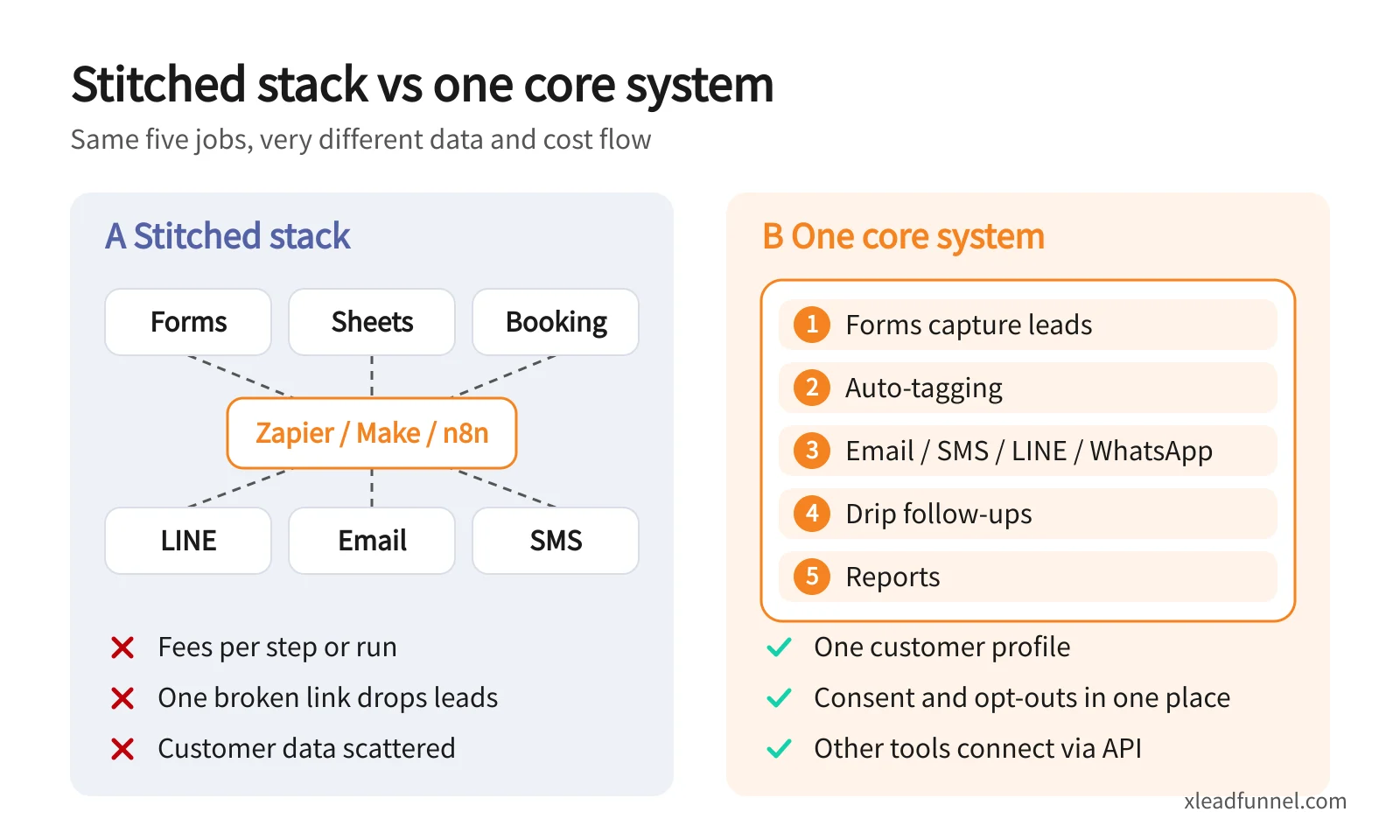
On the left, each job has its own tool (forms, sheets, booking, LINE, email, SMS), all joined through Zapier, Make or n8n. Every step can cost money, one broken link drops leads, and customer data ends up in several places. On the right, the core lives in one system: forms capture leads, contacts get tagged automatically, then email, SMS, LINE or WhatsApp follow-ups and reports run from the same place. There's one customer profile and one consent record, and other tools plug in through an API. The costs of stitching usually hide in six places:
- Usage fees grow with every step. Zapier counts each completed action as a task, Make counts each module action as a credit, and n8n counts each full workflow run as an execution. Say you get 20 leads a day, and each one triggers four actions: add a row to a sheet, send a confirmation email, notify yourself, and add the person to an email list. That's 20 × 30 × 4 = 2,400 actions a month, well past the 750 tasks in Zapier Professional's entry tier.
- When a connection breaks, you lose leads. Someone renames a spreadsheet column, a login expires, or an app changes something, and the flow quietly stops. Often nobody notices until a customer says they never got a confirmation.
- Data gets duplicated and inconsistent. The same customer shows up in your form, your sheet, your email list and your SMS list, with the phone number written as 09… in one place and +886 in another. Broadcasts then double-send or miss people.
- There's no single customer profile. What someone filled in, which emails they clicked and whether they visited are all in different dashboards. That makes it hard to segment by behavior or to tell which source actually brings in revenue.
- Consent and opt-outs are scattered. If a customer unsubscribes from email, your SMS and LINE lists don't update. Taiwan's Personal Data Protection Act and Hong Kong's Personal Data (Privacy) Ordinance both require you to explain how data will be used and to stop direct marketing when someone opts out. That's much harder when consent lives in five places.
- Staff time you never see. Reconciling bills in different currencies every month, fixing connections and cleaning lists by hand all come out of time you'd otherwise spend on the business. For a one-person company, that adds up fast.
Multi-tool stack or all-in-one platform: which fits you?
A multi-tool stack isn't a mistake. The right answer depends on your volume, your people and your channels.
When a multi-tool stack makes sense
- Low volume, and it already works. Free tiers cover you, and the connections rarely break.
- One job needs deep features. Large surveys with cross-tab analysis, or elaborate email design and testing, are usually done better by a specialist tool.
- You have technical people. If someone on the team is comfortable with n8n or Make, they can maintain the flows and even self-host n8n to keep costs down.
- You communicate in one channel. If nearly all your customers are LINE friends, a LINE Official Account on its own may handle most of it.
When an all-in-one platform fits better
- You have no developer, so a broken connection brings everything to a halt.
- Most leads come from forms, bookings or event sign-ups, and they need a fast follow-up.
- You use LINE, email and SMS together (or WhatsApp in Hong Kong) and want one complete record per customer.
- Integration fees or action counts now cost more than the tools themselves.
You don't have to replace everything at once. Consolidate the core and keep specialist tools at the edges. Capturing leads, tagging and follow-up are the three jobs that break most often and matter most for sales, so put those in one system and connect other tools through an API. To work out what you need from customer management first, read how to choose a CRM for a small business. If you're weighing up international platforms, ActiveCampaign alternatives covers what to check when you need LINE support and a Traditional Chinese interface.
How do you choose? A 9-point checklist
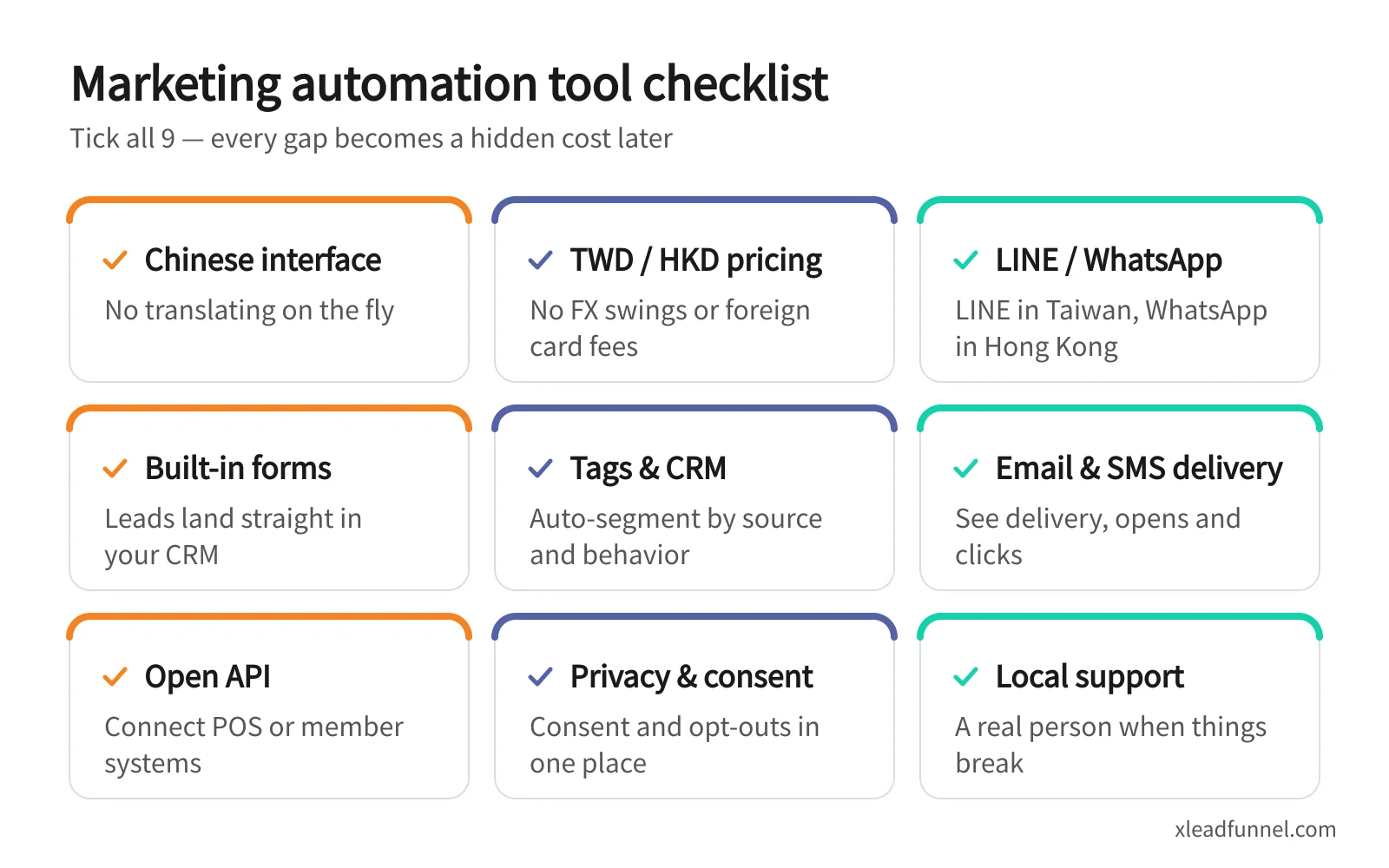
Check these nine points when you compare tools. Every gap turns into a hidden cost later:
- Traditional Chinese interface. Staff and customers see Traditional Chinese, so nobody is translating on the fly.
- TWD or HKD pricing. You avoid currency swings and foreign card fees.
- LINE or WhatsApp support. Taiwan uses LINE and Hong Kong uses WhatsApp. Ideally you send from the same system instead of adding another integration.
- Built-in forms. Submissions become customer records directly, with no spreadsheet in between.
- Tags and CRM. Contacts get tagged and segmented automatically by source, choices and behavior.
- Email and SMS delivery. You can see delivery, opens and clicks, and unsubscribes are handled for you.
- Open API. There's a clear path to connect your POS, membership system or website later.
- Privacy and consent. Consent and opt-out records live in one place, which makes local privacy rules easier to follow.
- Local support. When something breaks, you can reach someone in Chinese.
What does X Lead Funnel cover?
X Lead Funnel is a Pocket CRM and marketing automation platform built for solopreneurs, micro-businesses and SMBs. It has a Traditional Chinese interface, shows prices in HKD, TWD or USD, and offers a free plan. Here's how it maps to the five jobs:
A few things to know before you start. Confirmation and reminder emails sent by forms are included, while broadcast email uses an email quota top-up. SMS, MMS, WhatsApp and LINE messages use credits, and LINE and WhatsApp require integration and are available on subscription (paid) plans only. The free plan includes 30 new registrations a month and up to 200 contacts, enough to test the flow with a single form.
To connect existing systems, the CRM API can create users and update lists and tags from your POS or membership system, and the Messaging API can trigger email and SMS sends. Tools such as n8n and Make can call both through their HTTP request nodes. See omnichannel messaging automation for channels and sequences, five drip sequence templates for what to write, and subscription plans and pricing for form counts and usage limits.
FAQ
Are there free marketing automation tools?
Yes. Google Forms and Sheets are free. Mailchimp's free plan covers 250 contacts, Make's free plan includes 1,000 credits a month, n8n's Community Edition can be self-hosted for free, and the LINE Official Account Light plan includes 200 messages a month. X Lead Funnel also has a free plan with 30 new registrations a month and up to 200 contacts. Free tiers usually cap usage or features, so expect to upgrade as your list grows.
How much does marketing automation cost a small business per month?
It depends on your lead and message volume more than on how many tools you use. Estimate your monthly new leads, emails, SMS, LINE messages and integration actions, then compare them with the pricing models above. Per-message SMS and LINE fees and per-action integration fees are the costs most likely to grow with your list.
Zapier, Make or n8n: which is best for a small business?
Pick Zapier if you don't code and want the fastest setup. Pick Make if your flows are more complex and cost matters. Pick n8n if you have technical staff and want to self-host to control costs. With all three, you design and maintain the flows yourself, and you troubleshoot when a connection breaks.
What's the difference between marketing automation and a CRM?
A CRM remembers your customers: contact details, tags and interaction history. Marketing automation reaches out at the right moment by sending messages when certain conditions are met. The two should share data, or your automated messages will go to people whose real status has changed.
I already have a LINE Official Account. Do I still need a marketing automation tool?
That depends on whether all your contacts are LINE friends. A LINE Official Account is great for customers who have added you as a friend. For form leads who haven't, for email and SMS, and for a complete record across channels, you'll still need other tools.
Related articles
- Why Personal Branding Matters So Much in the Gig Economy
- Beyond Linktree: Explain Who You Are on One Page, and Keep the Client
- [Founder's Mindset] Jobs to Be Done: The McDonald's Milkshake Strategy