
Funnel Marketing
[Pro Tip] Automated Follow-Ups: 5 Drip Sequence Templates
Published
How to design automated follow-ups: the building blocks of a drip sequence, 5 ready-to-use templates with timing, channels and exit rules, common mistakes and the metrics to watch.
Contents
- What is drip marketing, and how is it different from a broadcast?
- What are the 7 building blocks of a follow-up sequence?
- Which channel should each step use?
- 5 drip sequence templates (with timing and copy)
- 5 common drip sequence mistakes
- Which metrics should you watch once it's live?
- How to set up automated follow-up in X Lead
- FAQ
Drip marketing is a way of nurturing your list by sending a series of messages automatically, one at a time, based on a trigger and a set of pre-planned delays. The moment someone fills in a form, books, registers or leaves items in a cart, their sequence starts. Hours or days later the next message goes out, and the next, until they reach the goal or the sequence ends. You design it once, and every new lead gets the right message at the right time from then on.
What is drip marketing, and how is it different from a broadcast?
A broadcast is one message sent to your whole list on the same day — great for launches, seasonal campaigns and announcements. A drip sequence starts from each person's own starting point: someone who signs up on Monday and someone who signs up on Friday both get the same message on day 1 and day 3 after they joined.
Three differences to remember:
- Timing: a broadcast follows your calendar; a drip follows the customer's behaviour.
- Content: a broadcast says one thing once; a drip builds step by step.
- Stopping: a broadcast ends when it's sent; a drip exits automatically when the customer hits the goal.
Collecting leads is the easy part. Following up consistently afterwards is where most small businesses fall behind. Interest peaks the moment someone leaves their details and cools fast if they hear nothing for days — which is exactly what an automated follow-up sequence fixes. If you haven't thought about lead "temperature" yet, start with Know Your Customer's Temperature.
What are the 7 building blocks of a follow-up sequence?
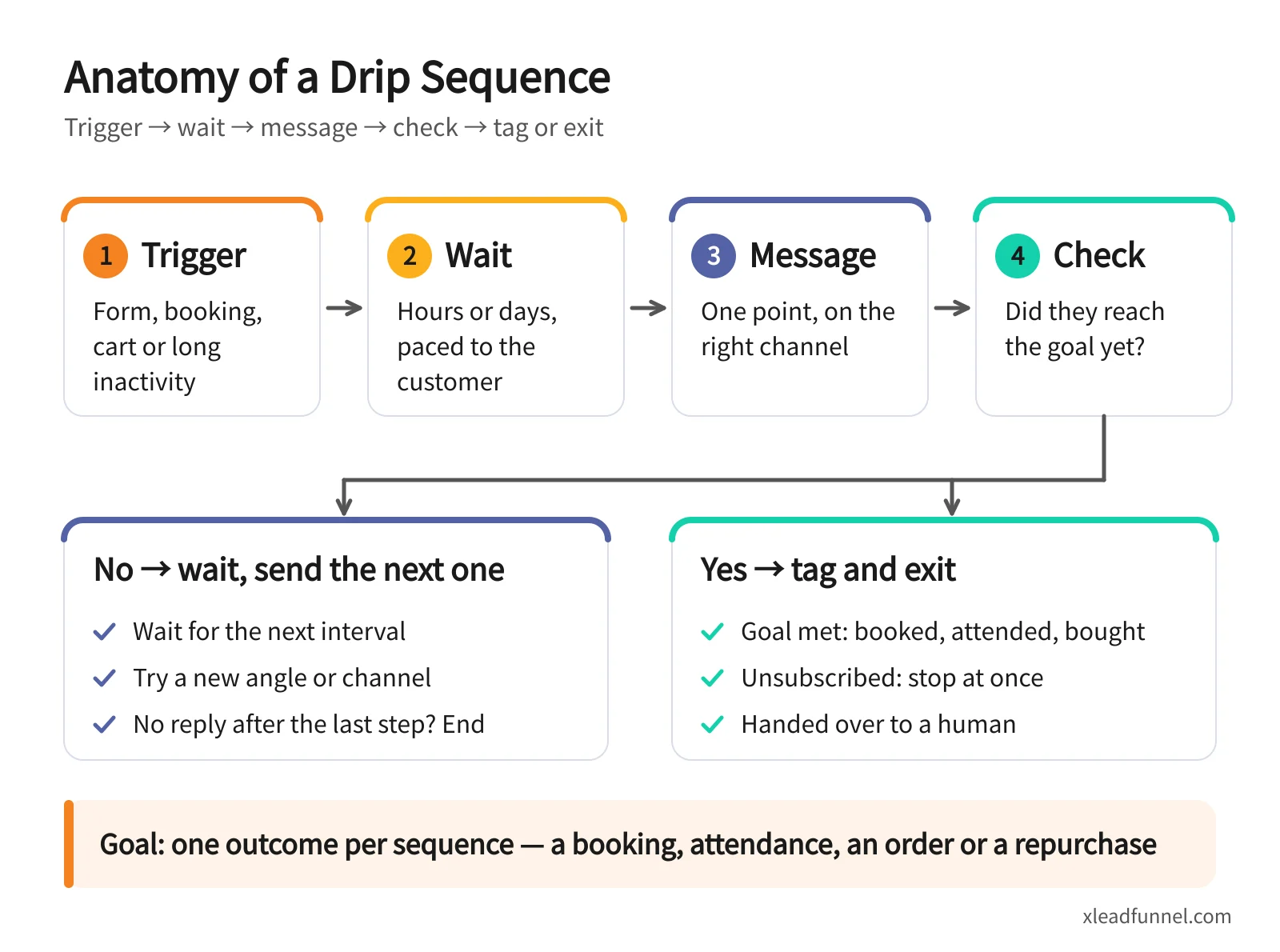
Whether it's an email automation sequence or LINE follow-ups, the structure is the same:
- Trigger: the event that starts the sequence — a form submission, a booking, a registration, an unpaid cart, or 90 days without a purchase.
- Wait: the gap between messages. Booking reminders run on hours and days; lead nurturing runs on days and weeks.
- Message: each message does one job — confirm, remind, teach, answer a question or invite — on the channel that suits it.
- Condition: before sending the next step, check whether the customer has already booked, paid or checked in.
- Tag: record what the customer did, such as "booked", "interested in courses" or "no-show", so you can segment and start the right next sequence.
- Exit rule: when to stop — goal reached, unsubscribed, handed over to a person, or the sequence has run out with no response.
- Goal: one outcome per sequence, such as a booking, attendance, a payment or a repeat purchase.
Write the goal and exit rule before you write a single message. That order prevents the classic mistake: a customer who has already paid still getting "You left something in your cart."
Which channel should each step use?
More channels isn't better. Match the channel to the message:
A few practical rules:
- Use email for depth and SMS or chat apps for must-see moments. In Taiwan that usually means LINE; in Hong Kong, WhatsApp. Put reminders where customers actually look.
- Save the pricier channels for the moments that matter. In a five-message sequence, usually only one or two need SMS, LINE or WhatsApp.
- Know WhatsApp's 24-hour window. According to Meta's pricing documentation, template messages have been charged per message since July 1, 2025. When a customer messages you, a 24-hour customer service window opens in which you can reply freely; outside it, you can only send approved templates.
- Estimate your LINE volume first. LINE Official Account plans each come with a monthly free message allowance, so multiply contacts by messages per month before you go live.
5 drip sequence templates (with timing and copy)
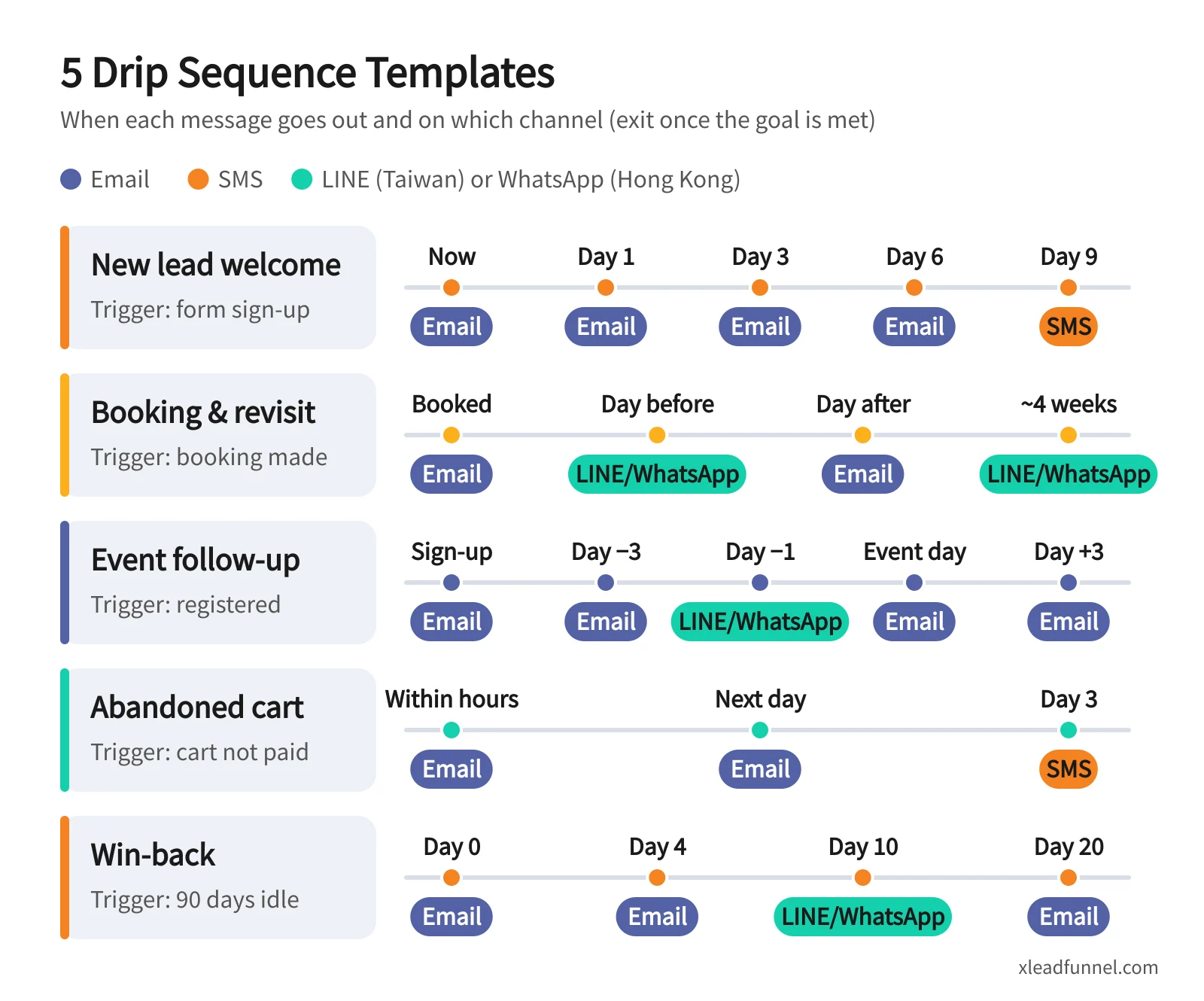
Treat the timings and copy below as starting points and adjust them to your industry and your customers' pace. The last column in each table is the exit condition: once a customer meets it, they get no further messages.
Template 1: New lead welcome and nurture
Trigger: a form sign-up or a new-customer offer claimed. Goal: a first booking or purchase.
Template 2: Booking confirmation, reminder and revisit
Trigger: a booking is made. Goal: the customer shows up and books again. Pair it with a booking form; for the full setup, see how to build an online booking form.
Match the revisit timing to the service: nails, haircuts and facials all run on different cycles, and for courses or consulting, invite them to the next stage instead.
Template 3: Event registration, reminders and post-event follow-up
Trigger: someone registers. Goal: they attend and take the next step afterwards. Pair it with an event registration form; for the full flow, see how to build an event registration form.
"No-show" is a tag worth keeping: these people were interested but the timing didn't work, so tell them first when the next event opens.
Template 4: Interested but didn't buy (abandoned cart)
Trigger: an unpaid cart, or an enquiry that didn't turn into an order. Goal: payment completed. For the full approach — reduce abandonment first, then remind — see abandoned cart remarketing.
Template 5: Win back sleeping customers
Trigger: no purchase or engagement for a while — say 90 days, adjusted to your repurchase cycle. Goal: a new purchase, or a clear answer on whether they still want to hear from you.
That last "still want to hear from us?" email feels risky, but it cleans your list and protects your sender reputation. For a real brand example, read Winning Back Customers: A Re-engagement Success Story.
5 common drip sequence mistakes
- Sending too often. A message every day gets you unsubscribed or blocked. Front-load a little, then stretch the gaps.
- No exit rule. Reminding someone who has already paid or booked is the fastest way to lose trust. For every message, ask: "Who should not get this?"
- Discounting too early. Lead with a discount and customers learn to wait for one. Remind first, answer questions next, and only then consider an incentive.
- One message for everyone. A warm lead who asked for a quote and a cold lead who just discovered you need completely different content. Use tags to send different sources and interests down different sequences.
- No consent and no way to unsubscribe. Tell people on the form what you'll send them, and include an unsubscribe option in every marketing message. Under Article 20 of Taiwan's Personal Data Protection Act, the first marketing contact must offer a way to refuse, and marketing must stop once someone objects. Hong Kong's Unsolicited Electronic Messages Ordinance requires commercial electronic messages to include sender information and an unsubscribe facility, and unsubscribe requests must be honoured within 10 working days. And under Gmail's sender guidelines (in effect from February 2024), anyone sending more than 5,000 emails a day must support one-click unsubscribe in marketing messages. (This is general information, not legal advice.)
Which metrics should you watch once it's live?
- Delivery and bounce rate. Lots of bounces mean list-quality problems — clean out invalid addresses first.
- Click rate. A better signal of interest than opens. Apple Mail's privacy protection downloads remote content in the background when an email arrives, so an email can register as "opened" even if nobody read it, which inflates open rates.
- Conversion rate. How many people reach the sequence goal — booking, attendance, payment, repurchase. This is the one that matters most.
- Unsubscribe rate. A spike after a particular message usually means it was irrelevant or came too soon.
- Drop-off by step. Find the message after which people stop engaging and fix that one, rather than rewriting the whole sequence.
Change one variable at a time — timing, subject line or channel — and give it two to four weeks. It's much easier to see what worked.
How to set up automated follow-up in X Lead
X Lead Funnel brings lead capture, tagging and automated follow-up into one platform, so solopreneurs and small businesses can put the templates above to work directly:
- Capture leads with a lead form. Pick a template such as general enquiry, booking, offer redemption or event registration; every submission is filed automatically.
- Tag automatically. Contacts are tagged by source, answers and behaviour — for example "Booking: facial" or "Seminar: registered".
- Let tags trigger drip sequences. Set the wait and the message for each step, and let a tag start the matching follow-up.
- Choose your channels. Confirmation and reminder emails sent by forms are included in the service; broadcast email uses a top-up quota, while SMS, MMS, LINE and WhatsApp use credits. LINE and WhatsApp require integration and are available on subscription (paid) plans only.
- Tune with reports. Use click, open, unsubscribe and bounce data to find the steps worth rewriting.
If your customer data lives in a POS or membership system, you can also create contacts and update tags through the open API. For the four channels and drip features, see omnichannel messaging automation; for the full journey from first lead to repeat purchase, see the customer journey platform.
FAQ
What's the difference between drip marketing and EDM?
EDM is marketing sent by email — it can be a one-off broadcast or a single step in a sequence. Drip describes how messages are sent: automatically, in stages, based on a trigger and delays. One drip sequence can mix email, SMS, LINE and WhatsApp.
How many messages should a follow-up sequence have?
Three to five is enough for most cases: three for abandoned carts, three or four for booking reminders, four to six for new lead nurturing. Rather than adding messages, make sure each one has a clear purpose and an exit condition.
How far apart should messages be?
It depends on how quickly customers decide. Booking and cart reminders run on hours and days; nurturing for high-ticket services or courses can stretch to one message every few days or a week; win-back sequences can be spaced even further apart.
Can I set up a drip sequence without technical skills?
Yes. Use the tables in this article to write down the trigger, timing, channel and exit condition, then recreate them in your marketing automation tool. In X Lead, form templates are ready to use and contacts are tagged by source and answers automatically, so you only set the timing and the messages.
Does automated follow-up on LINE or WhatsApp cost money?
Yes. LINE Official Accounts and the WhatsApp Business Platform each have their own message pricing. In X Lead, LINE and WhatsApp require integration, are limited to subscription plans and use credits. Email is usually the lowest-cost workhorse of a sequence; keep LINE, WhatsApp and SMS for the reminders that matter most.
Related articles
- From funnel form to follow-up: how multi-channel drip sequences actually work
- Service Booking Automation: Reminders, LINE Follow-Up & Rebooking
- n8n vs Zapier vs Make for Funnels: When Not to Build Your Own