
Funnel Marketing
Online Booking Form: What to Collect & How to Cut No-Shows
Published
How to set up an online booking form for salons, clinics and tutors: fields to collect, reminders that cut no-shows, and Google Forms vs a booking system.
Contents
An online booking form lets customers choose a service and time slot themselves — the booking is done the moment they hit submit. Compared with trading messages to agree on a time, a good booking form shows only the slots that are still open, closes a slot when it's full, and sends confirmations and reminders automatically. You take bookings after hours without living on your phone.
Who needs an online booking form most?
Any business that runs on appointments:
- Nail, lash and hair studios
- Massage, spa and skincare
- Pet grooming
- Personal training, tutoring and classes
- One-on-one consulting, counselling and financial planning
- Clinics and aesthetic practices
- Room and venue rentals
They tend to share three problems: hours lost negotiating times over chat, after-hours booking requests nobody answers, and customers who simply forget to show up. A booking form is built to solve exactly those three.
What should a booking form collect?
Ask only what you need to deliver and follow up. Every extra field gives people another reason to abandon the form.
Clinics and counselling practices should take extra care: collect only what's needed to schedule the visit, keep medical details out of a general booking form, and follow local privacy law (such as Taiwan's Personal Data Protection Act or Hong Kong's Personal Data (Privacy) Ordinance).
How automated messages reduce no-shows
Most no-shows aren't deliberate — people forget, or something comes up and they feel awkward saying so. These habits help:
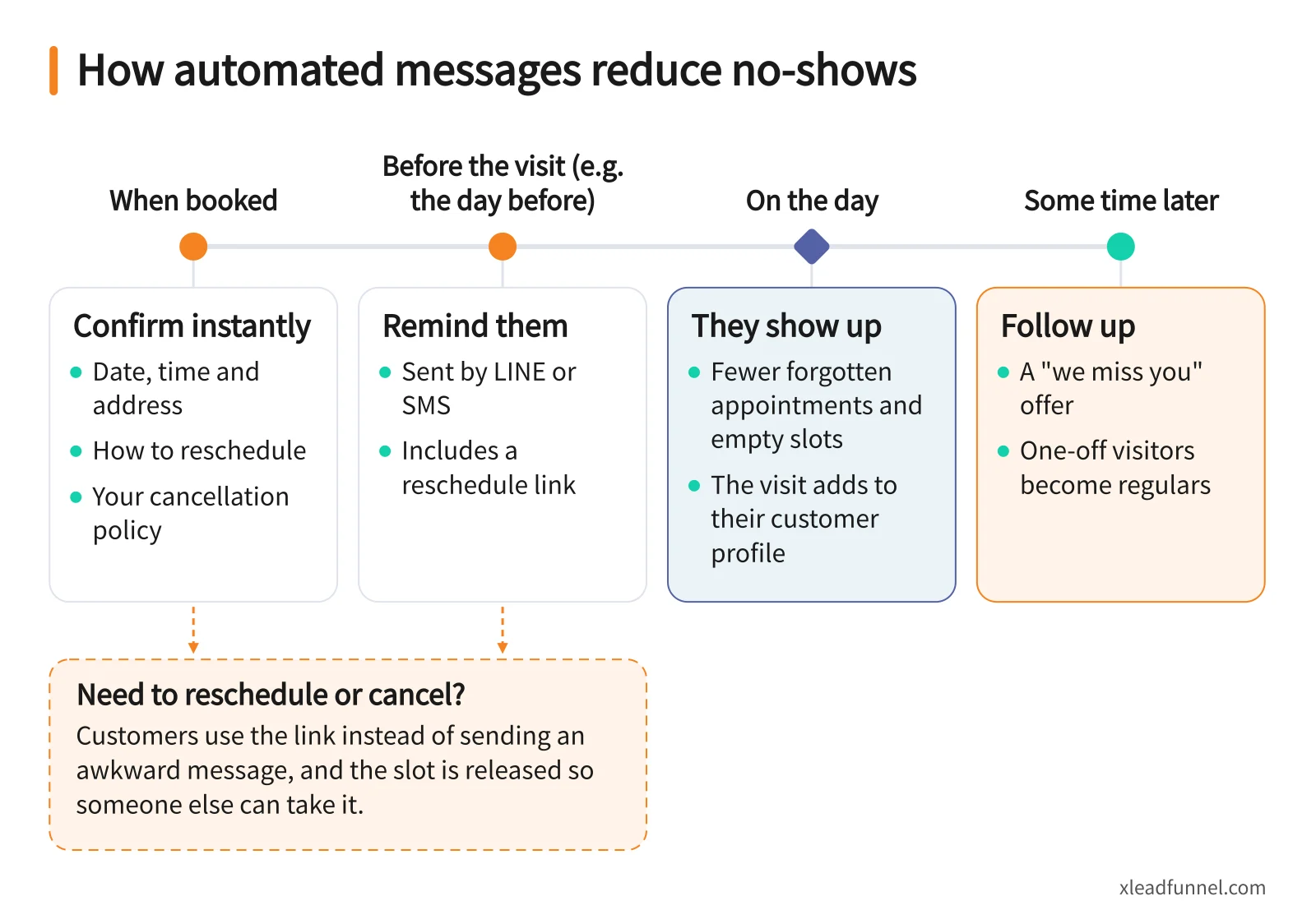
- Confirm instantly. Include the date, time, address and how to reschedule, so it feels like a commitment.
- Remind them before the visit. For example the day before, on the channel they check most — LINE or SMS.
- Include a reschedule link. Customers can change or cancel without an awkward message, and the slot opens up for someone else.
- State your cancellation policy. Put it in the form and the confirmation so expectations are clear.
- Follow up after the visit. A "we miss you" offer some time later turns one-off visitors into regulars.
Google Forms vs a dedicated booking form
Google Forms is free and easy, but it is a data-collection tool — it wasn't designed around time slots.
Bottom line: for the occasional booking, Google Forms is fine. If you take bookings every week — or no-shows are already costing you — a dedicated booking form saves far more time and empty slots.
How to set up an online booking form in 6 steps (with X Lead Funnel)
- Sign up free and pick the Booking template. Common fields and the flow are already in place.
- Set services, staff and capacity. Add your services, your team and each day's bookable slots with the number of spots per slot.
- Trim the fields. Keep name, mobile, service and slot; add anything else only if you need it.
- Check the automated messages. Make sure the confirmation and reminder spell out the address and how to reschedule.
- Publish and share. You get a dedicated link and QR code — add it to your LINE Official Account, Instagram bio, Facebook page, or print it on in-store cards and business cards.
- Use the reports to tune your schedule. Bookings by source and slot popularity show whether to add peak hours or drop quiet ones.
Customers can book inside LINE or on a standalone booking page, and you manage the schedule from your phone. See the full feature set on the booking form page.
After the booking: turning one visit into a regular
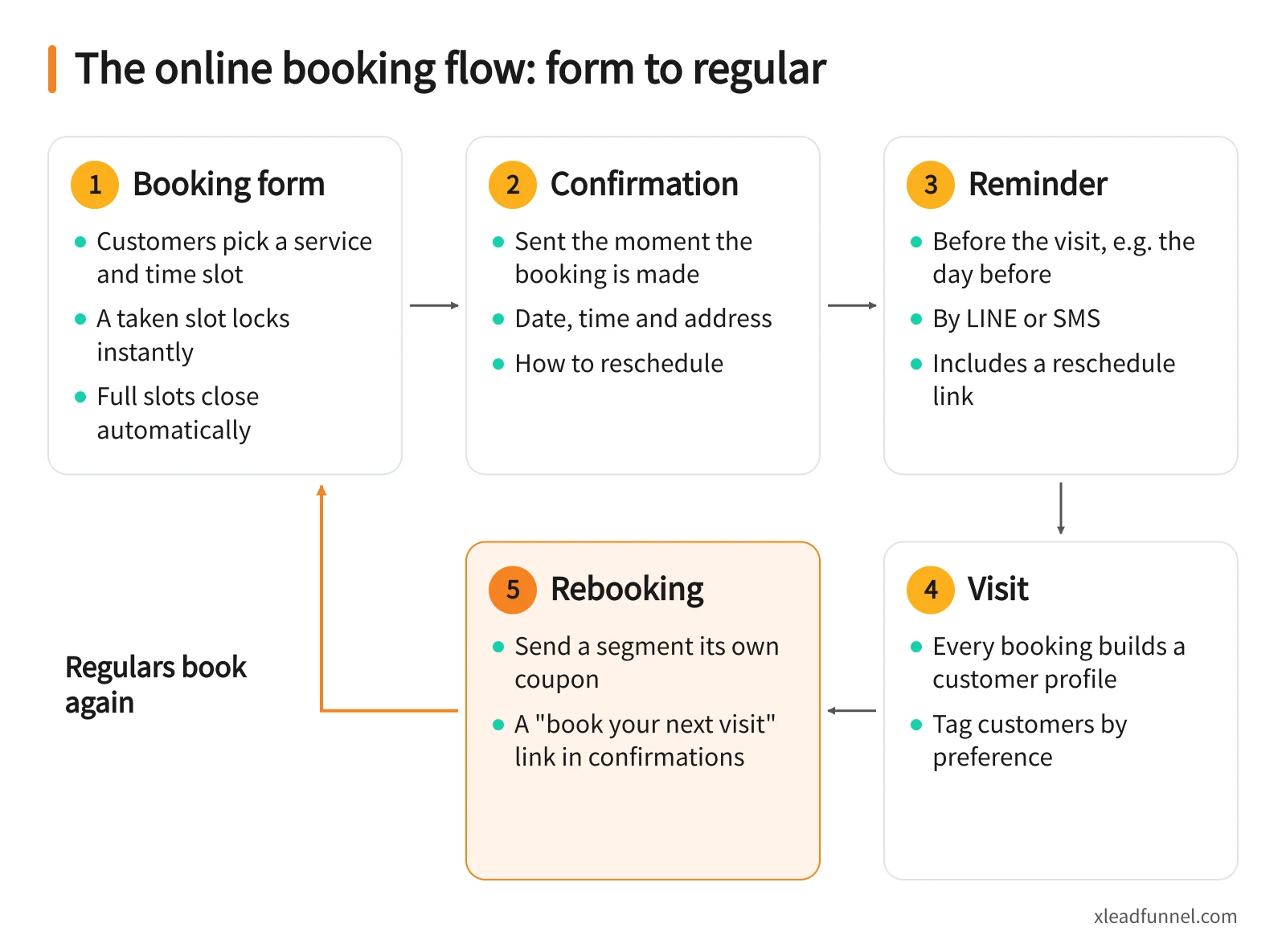
Every booking builds a customer profile — who comes often, what they had, how long since their last visit. Tag customers by preference and send a segment its own coupon; when a slot opens up at short notice, broadcast it in one tap. To design automated follow-up across email, SMS, LINE and WhatsApp, see messaging automation.
FAQ
Is there a free online booking system?
Yes. X Lead Funnel's free plan includes the booking form, and confirmation and reminder emails sent by the form are included in the service. SMS, LINE and WhatsApp messages use credits; LINE and WhatsApp require integration and are available on subscription plans.
What if a customer needs to reschedule or cancel?
Put the reschedule option in your confirmation and reminder. With an X Lead booking form, a rescheduled or cancelled booking releases its slot automatically so someone else can take it.
Should customers book through LINE or a web page?
It depends on where your customers are. Regulars often live in your LINE Official Account, while a web booking link works well in social posts, ads and search results. X Lead's booking form supports both.
Is a booking form worth it for a one-person studio?
Absolutely. When you're serving clients and answering messages alone, bookings are the first thing to slip. A booking form with automatic confirmations and reminders is like hiring a front desk that never closes. More ideas on the solopreneurs page.
Where should I put my booking link?
Wherever people decide they want to book: your LINE Official Account menu, Instagram bio, posts and stories, a QR code on the counter, and a "book your next visit" link in your confirmation messages.
Related articles
- Event Registration Form: Setup, Reminders & Check-in Guide
- From funnel form to follow-up: how multi-channel drip sequences actually work
- Service Booking Automation: Reminders, LINE Follow-Up & Rebooking