
Funnel Marketing
Service Booking Automation: Reminders, LINE Follow-Up & Rebooking
Published
How service businesses automate what happens after a booking: confirmations, reminders, review requests and rebooking nudges, with typical revisit cycles by industry and message examples.
Contents
- Why is the money in rebooking, not the first booking?
- The customer loop after a booking: 8 automated touchpoints
- Typical revisit cycles by industry, and when to remind
- 5 customer tags that make automated rebooking work
- How do you word a no-show and cancellation policy without souring things?
- Consent and message frequency: what should rebooking reminders respect?
- Setting up service booking automation in X Lead Funnel
- FAQ
Booking automation for service businesses means letting a system send confirmations, reminders, thank-yous, care tips and rebooking messages on a schedule after someone books — so one appointment leads to the next. For home cleaning, nail and lash studios, hair salons, pet groomers, tutors and coaches, and massage and spa businesses, the money isn't in the first booking. It's in the second, the third and every visit after that.
If you're still deciding what your booking form should collect or how to cut no-shows, start with our guide to online booking forms. This article picks up where the form leaves off: how to follow up automatically across the whole revisit cycle.
Why is the money in rebooking, not the first booking?
Every new customer costs something to win: ad spend, a first-visit discount, and the back-and-forth of learning what they want. A regular is different. She already trusts your work, knows your prices and likes how you do things — she just needs a nudge when it's about time.
Three things about repeat visits make automation especially worthwhile:
- The need comes back on a cycle. Nails grow, hair grows, homes get dusty, coats get matted. The customer will need the service again; the only question is whether they come to you.
- Miss the moment and you lose them. When a customer lets the cycle slip, it's rarely because they were unhappy. They got busy, forgot, and booked whoever was nearest.
- The messages are predictable. Which service, when they're due, what to say — you can plan all of it once instead of improvising every time.
Turning rebooking into a routine is how you raise each customer's long-term value. For more on moving customers up the value ladder, see 4 keys to cultivating lifetime value.
The customer loop after a booking: 8 automated touchpoints
From one booking to the next there are eight touchpoints. Only the visit itself needs you; everything else can go out automatically on a schedule.
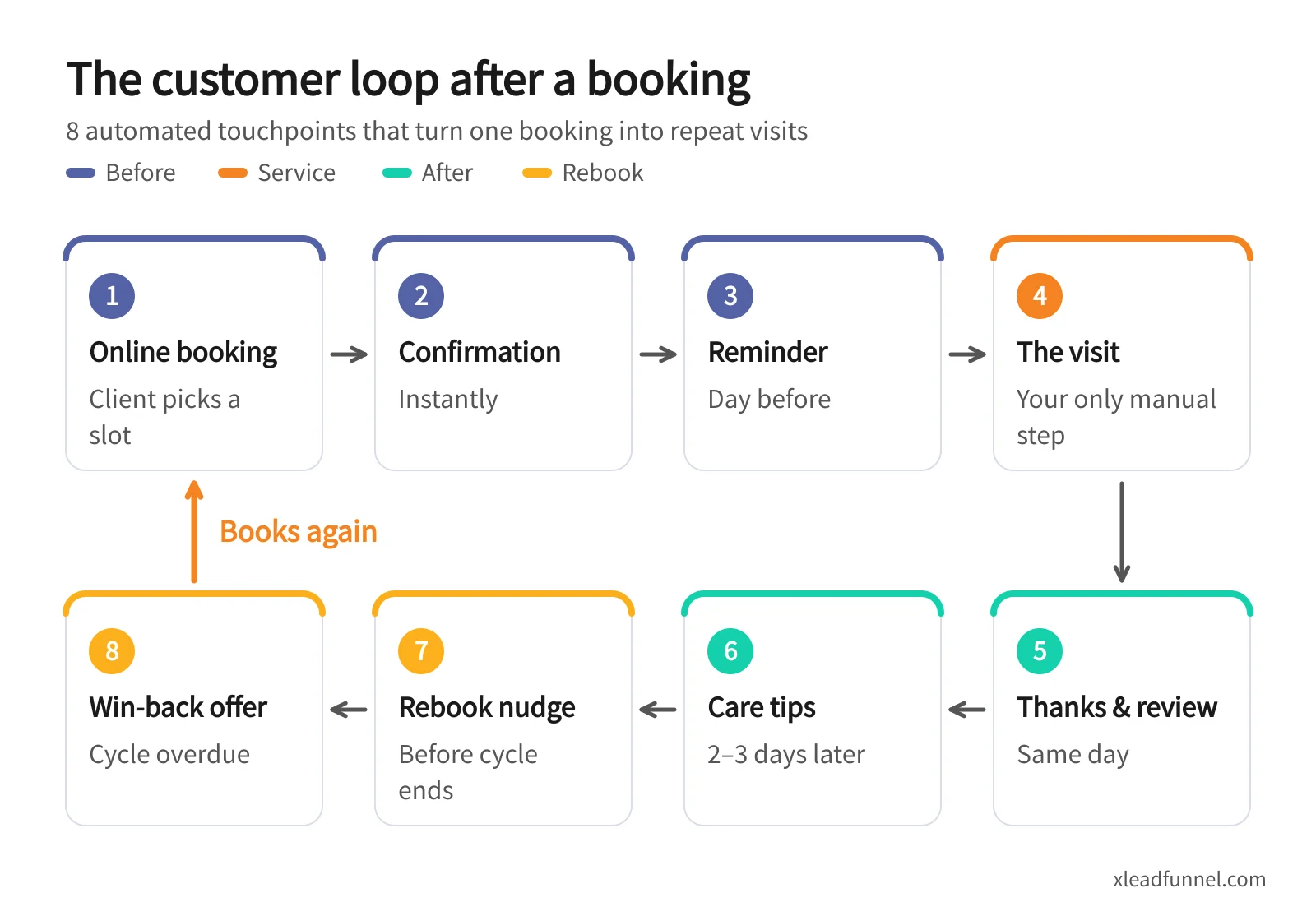
A few principles for these touchpoints:
- Confirmations and reminders are service messages. Keep them short and complete, with no promotions attached.
- Ask for one thing in the thank-you. Either a review or feedback — for example a link to your Google Business Profile reviews, or a satisfaction survey of three questions or fewer.
- Care tips build trust. Don't pry things open with fresh gel nails, how to wash newly coloured hair, a storage tip after a deep clean — it shows expertise without selling.
- Always include a booking link in the rebooking nudge. Customers can pick a slot straight from the message instead of starting a chat.
- Give win-back offers a deadline, and send them only to people who really haven't returned. Otherwise regulars learn to wait for a discount.
Typical revisit cycles by industry, and when to remind
Remind too early and customers feel rushed; too late and they've already gone elsewhere. The table below shows common ranges by industry — adjust them to your own clients, services and price points. Your customers' actual visit history is always the best guide.
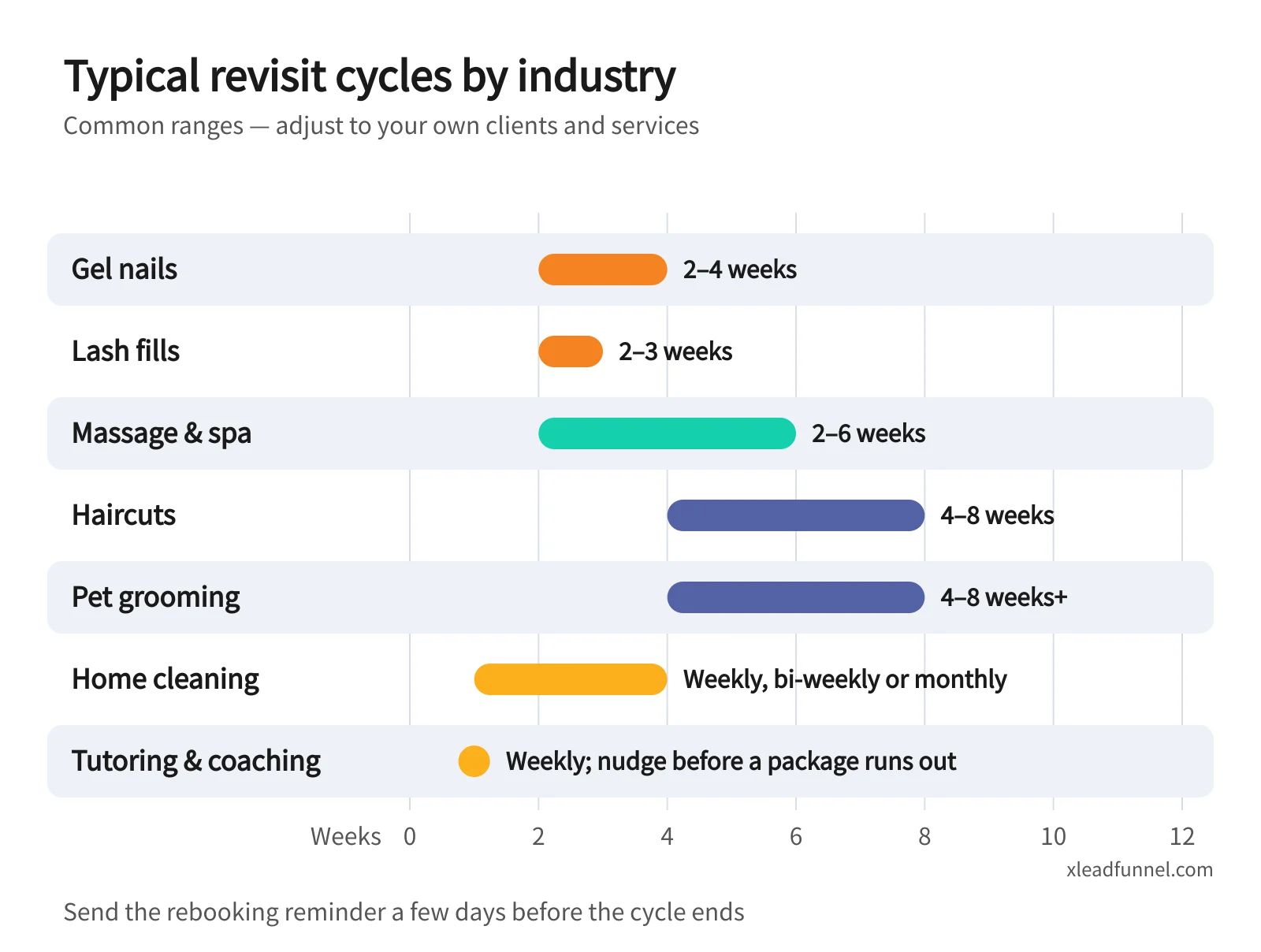
On channels: regulars in Taiwan mostly live on LINE, while Hong Kong leans on WhatsApp. SMS suits reminders that mustn't be missed; email suits longer aftercare notes.
5 customer tags that make automated rebooking work
Whether automation reaches the right people comes down to tags. The service and staff choices on your booking form, plus visit history, are enough to build these five:
Keep one more tag too: "no marketing messages." Apply it the moment a customer says they don't want rebooking or promotional messages, exclude it from marketing segments, and send only essential notices such as booking confirmations.
How do you word a no-show and cancellation policy without souring things?
A no-show policy exists to protect your time slots, not to punish customers. Put it in three places — the booking form, the confirmation and the reminder — so customers see it at every step. Three principles help:
- Offer the easy option first, then the rule. Give the reschedule link before saying how much notice you need.
- Explain why. For example: "Every slot is held just for you, and last-minute cancellations mean someone else can't book."
- Be specific. Say "24 hours before your appointment" or "by 8 pm the day before," not "please let us know as early as possible."
Example messages:
- Confirmation: "Your gel manicure is booked for Tue 12 May at 2:00 pm. To reschedule, use this link at least 24 hours ahead so the slot can go to someone else."
- Reminder: "See you tomorrow at 2:00 pm! If something comes up, tap here to reschedule — thank you for understanding."
- After a no-show: "We missed you today and hope all is well. Whenever it suits you, tap here to pick a new time."
Keep the tone gentle after a no-show. If the same customer misses repeatedly, tag them and confirm future bookings personally. If you take deposits, spell out the refund and forfeit rules in the confirmation as well.
Consent and message frequency: what should rebooking reminders respect?
Booking confirmations and reminders help deliver the service, and customers generally expect them. Rebooking nudges, aftercare content and win-back offers are marketing, so handle them with more care.
Get consent first
- Add messaging consent to your booking form and say clearly what customers will receive — for example "rebooking reminders and offers."
- Taiwan's Personal Data Protection Act, Article 20, requires a non-government organisation that uses personal data for marketing to stop immediately when the person refuses, and to give them a way to refuse the first time it markets to them (Laws & Regulations Database of Taiwan).
- Hong Kong's Personal Data (Privacy) Ordinance, Part 6A, requires consent before personal data is used for direct marketing; silence does not count as consent, and people can opt out at any time (Office of the Privacy Commissioner for Personal Data).
Keep frequency in check
- Send one rebooking nudge per cycle, plus at most one follow-up if there's no response.
- Try a win-back offer no more than twice. If there's still no response, pause and switch to low-frequency messages such as holiday greetings or new-service news.
- Avoid late-night and early-morning sends; reminders work best during the day before the visit.
- Include a way to opt out of every marketing message.
Fewer, well-timed messages keep customers better than frequent, scattered ones — and once someone blocks you, even your confirmations and reminders may stop reaching them.
Setting up service booking automation in X Lead Funnel
Here's how to connect the whole loop in X Lead Funnel:
- Create the booking form. Use the booking form to set services, staff and slot capacity. Bookings are confirmed automatically, reminders go out before the visit, and reschedules or cancellations release the slot. For fields and no-show settings, see the online booking form guide.
- Plan your tags. Tag customers by service, preferred staff and source. Every booking adds to the customer profile, so you can see who comes often, what they had and how long they've been away.
- Build a Drip sequence. Line up the thank-you, care tips and rebooking nudge as a Drip sequence that sends at the intervals you choose. For ready-made patterns, see 5 Drip follow-up sequence templates.
- Choose your channels. Omnichannel messaging automation covers email (EDM), SMS/MMS, LINE and WhatsApp. Confirmation and reminder emails sent by forms are included; SMS, MMS, LINE and WhatsApp use credits, and LINE and WhatsApp require integration and a subscription plan.
- Win customers back with named coupons. Use the redemption offer form to create a limited, time-bound comeback offer for the segment that's past its cycle. Each claim files and tags the customer automatically, unused coupons trigger a reminder before they expire, and staff redeem them in store.
- Use the reports to tune your cycles. New versus returning customers and the average gap between bookings tell you when your rebooking nudges should go out.
Solo studios are the most likely to miss follow-ups while they're busy with clients. If you run your business on your own, see the solopreneurs page for Pocket CRM and the LINE digital business card.
FAQ
How do I choose a booking system for a service business?
Check three things: can you set services, staff and slot capacity; does it confirm and remind automatically; and can it tag customers by service and visit history to send rebooking messages? The third decides whether it's just a way to take bookings or a way to keep regulars.
What features does a nail salon booking system need?
Beyond online slot selection and closing full slots automatically, nail and lash studios most need rebooking reminders set by service: gel nails commonly run 2–4 weeks and lash fills 2–3 weeks. Add a preferred-technician tag and you can share each technician's open slots in her name.
How often should I send rebooking reminders?
Follow the service's revisit cycle: one nudge per cycle, plus at most one follow-up. If the customer is past their cycle, switch to a time-limited win-back offer and stop after two tries.
How should I schedule reminders for regular home-cleaning clients?
Regular clients (weekly, bi-weekly or monthly) are best confirmed 2–3 days before each clean, with any notes for the visit. One-off clients can get a reminder before seasonal or holiday deep cleans. Your post-visit thank-you is also a natural place to explain how a regular cleaning schedule works.
Can I automate rebooking without a LINE Official Account?
Yes. Send rebooking reminders by SMS or email instead. Confirmation and reminder emails sent by forms are included; separate broadcast emails need an email quota top-up, and SMS uses credits. If your regulars later turn out to prefer LINE or WhatsApp, upgrade to a subscription plan and connect the integration.
Related articles
- Event Registration Form: Setup, Reminders & Check-in Guide
- From funnel form to follow-up: how multi-channel drip sequences actually work
- n8n vs Zapier vs Make for Funnels: When Not to Build Your Own