
Funnel Marketing
n8n vs Zapier vs Make for Funnels: When Not to Build Your Own
Published

Should you build your marketing funnel in n8n, Zapier or Make? Compare their pricing models, the 7 weak points of a hand-built chain, and when an all-in-one core plus open APIs is simpler.
Contents
- The short answer: when don't you need to build it yourself?
- What are n8n, Zapier and Make, and how do they charge?
- What does a hand-built funnel look like — and where does it break?
- DIY vs all-in-one: build, run and maintenance costs
- When to use n8n, Make or Zapier — and when an all-in-one covers it
- The hybrid setup: an all-in-one core plus n8n or Make at the edges
- FAQ
n8n, Zapier and Make are excellent at connecting systems — but they aren't always the best way to hand-build the core of a marketing funnel. If what you need is a form that captures leads, tags them automatically and follows up by email, SMS, LINE or WhatsApp, an all-in-one system usually does that out of the box. Automation tools earn their keep at the edges of the funnel: the unusual, niche or internal jobs.
This isn't a case against these tools. n8n has a very active community in Taiwan, and plenty of teams rely on Zapier and Make every day. The point is simple: use them for the edges, not to rebuild the core.
The short answer: when don't you need to build it yourself?
- Don't build it yourself when your need is the standard path: form → contact list → tags → multichannel follow-up.
- Build it yourself when you're connecting the funnel to internal operations, AI steps, niche apps or custom reporting.
- The practical middle ground: keep the core in one system and connect everything else with n8n, Make or Zapier through APIs.
If you're still mapping out the stages of your funnel, start with what a marketing funnel is.
What are n8n, Zapier and Make, and how do they charge?
All three are workflow automation tools: when A happens (say, a form is submitted), do B, C and D automatically. They differ in how you build, where they run and what they bill for. The table reflects each vendor's published pricing model at the time of writing (March 2026); prices and allowances change often, so check the official sites.
Zapier: fastest to learn, billed by tasks
Zapier's strengths are an intuitive builder and a huge app catalogue. According to Zapier's help center, a task is a successful action, and trigger steps don't count. So a lead that sets off five actions uses five tasks — the more steps and the more leads, the faster usage climbs.
Make: visual scenarios, billed in credits
Make shines with its drag-and-drop scenario canvas, which suits flows with lots of branches. Make's announcement explains that in August 2025 its billing unit changed from operations to credits, converted 1:1, with most module actions still costing one credit.
n8n: billed per execution, and self-hostable
n8n's pricing page bills by workflow executions: one execution is one full run of the workflow, no matter how many steps it contains, which makes long workflows comparatively economical. n8n also offers a self-hosted Community Edition that, per its documentation, is free to use. Self-hosting does mean the server, installation, updates, backups and security are on you, and n8n notes that it takes technical expertise.
What does a hand-built funnel look like — and where does it break?
A typical DIY funnel looks like this: a form on your website or event page → rows in a Google Sheet → synced to a CRM → added to an email tool for the welcome email → a push notice through the LINE Messaging API → a reminder via an SMS provider. Six systems and five connections. It usually works fine on day one; the trouble tends to show up a few months later.
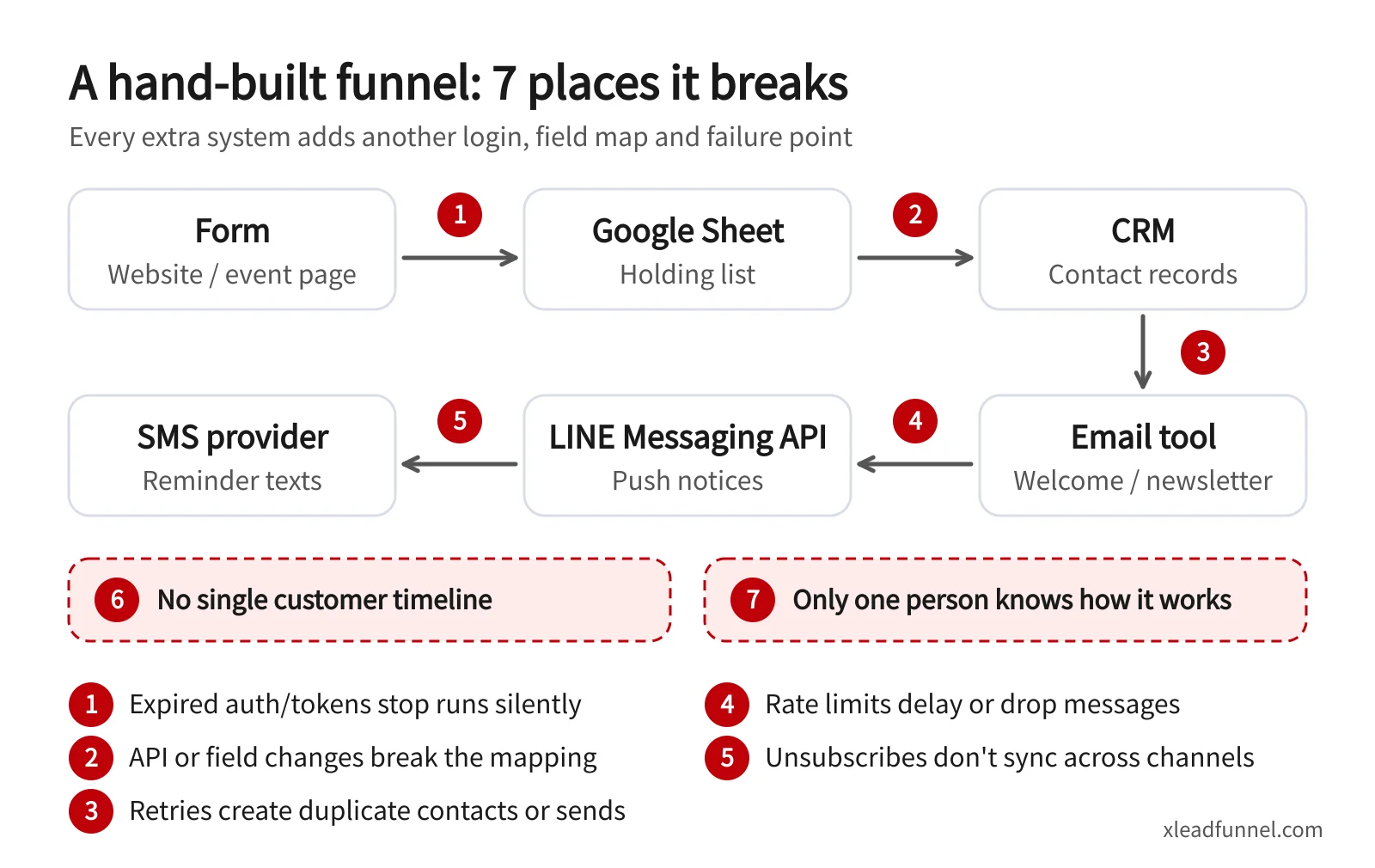
- Expired auth or tokens. Someone changes a password, a token expires or a former employee's account is disabled, and the flow stops silently — until someone asks why there haven't been any new leads.
- API or field changes. A spreadsheet column gets renamed or a service updates its API, the field mapping shifts, and data lands in the wrong place.
- Retries and duplicates. An automatic retry after a network hiccup can create the same contact twice and send two welcome emails.
- Rate limits. A campaign spike pushes you past a platform's API limits, and messages are delayed or fail outright.
- Consent and unsubscribes out of sync. A customer unsubscribes from email, but SMS and LINE keep coming. That's a poor experience — and a compliance issue under direct-marketing rules such as Taiwan's Personal Data Protection Act and Hong Kong's Personal Data (Privacy) Ordinance.
- No single customer timeline. Which forms someone filled in, which emails they opened and which texts they received are spread across six systems, so whoever replies has to check each one.
- One person who knows how it works. When the colleague or freelancer who built it moves on, nobody dares to touch it.
For a smaller example, see 3 ways to send a LINE notification when a Google Form is submitted — even a single connection runs into auth and field-mapping issues.
DIY vs all-in-one: build, run and maintenance costs
Don't compare monthly subscriptions alone. Here is how three approaches differ when you build, run and maintain them:
Bottom line: if you have engineers and unusual requirements, the flexibility of building it yourself is hard to beat. If you're a solopreneur, studio or small team that just needs "new lead in, follow-up out", the hours spent wiring and repairing flows often cost more than any subscription. For a fuller look at tool stacks and budgets, read how to choose marketing automation tools.
When to use n8n, Make or Zapier — and when an all-in-one covers it
Good jobs for automation tools
- Internal operations: notify the warehouse about new orders, compile a weekly sales report, sync invoices into accounting software.
- AI / LLM steps: summarise customer messages, classify enquiries or draft replies for a human to review.
- Niche or in-house systems: industry-specific software, your own database or services without ready-made integrations.
- Custom reporting: pull data from several sources into a spreadsheet or BI tool.
What an all-in-one system usually covers
- Lead capture forms: enquiries, bookings, offer claims, event registration and surveys that create contacts on submit — see the lead forms overview.
- Automatic tagging and segmentation: tag by source, behaviour or survey answers without writing sync rules.
- Multichannel follow-up: email, SMS, LINE and WhatsApp drip sequences triggered by tags. LINE dominates in Taiwan and WhatsApp in Hong Kong, and both are set up in the same place — see omnichannel messaging automation. For sequence ideas, read 5 drip follow-up sequence templates.
A quick rule of thumb: if a flow touches customers directly (capturing leads, sending messages, handling unsubscribes), put it in the core system. If it only moves data inside your business or between specialist systems, that's the job for an automation tool.
The hybrid setup: an all-in-one core plus n8n or Make at the edges
Most growing small businesses end up here: one system runs the funnel, and automation tools feed data in from other systems or trigger actions.
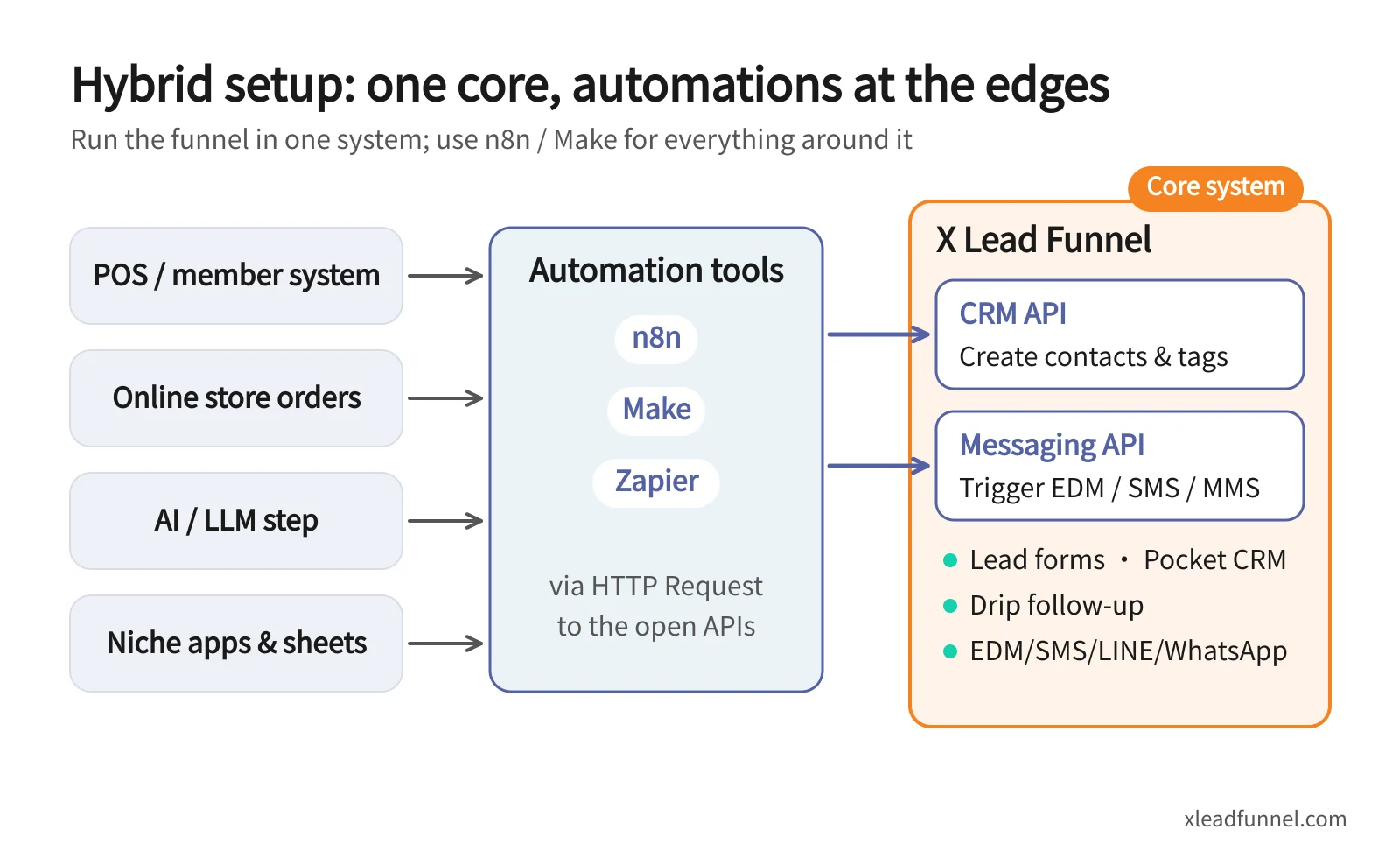
With X Lead Funnel, the setup has two layers:
- Core (X Lead): lead forms capture contacts, Pocket CRM organises them and applies tags, and drip sequences follow up by email, SMS, LINE and WhatsApp. LINE and WhatsApp require integration and are available on subscription plans.
- Edges (n8n, Make or Zapier): data from your POS, online store, member system or AI steps goes through the tool's HTTP request node or module to X Lead's open APIs:
- CRM API: create contacts and update lists and tags from other systems (CRM API docs).
- Messaging API: trigger EDM, SMS and MMS sends directly (Messaging API docs).
To be clear, X Lead doesn't currently offer a native n8n, Make or Zapier connector; these tools call the APIs through their HTTP request features. For example, a retail shop could have n8n call the CRM API whenever the POS registers a new member, creating the contact with an "in-store member" tag — and X Lead then runs the welcome message and win-back sequence on its own. The automation shrinks to one connection, there are far fewer failure points, and the customer timeline lives in one place. For high-volume sending, segmentation and API integration at company scale, see X Lead for business.
FAQ
Can n8n be used for marketing automation?
Yes. n8n can connect forms, CRMs, email tools and almost any API, and it's popular for adding AI steps. But if you build the whole funnel from scratch in n8n, auth, field mapping, duplicates and unsubscribe syncing are all yours to handle. The lighter approach is to let n8n handle the connections around the edges and keep the core in a dedicated system.
Which is cheapest: n8n, Zapier or Make?
It depends on the shape of your flows. Zapier bills by tasks, so step-heavy flows add up quickly; Make bills in credits, with most module actions costing one; n8n Cloud bills per execution regardless of step count. n8n's self-hosted Community Edition is free to use, but you need to factor in hosting and maintenance.
Is self-hosted n8n really free?
The Community Edition is free to use, but server costs, installation, updates, backups and security are your responsibility, and some collaboration and enterprise features (such as SSO, projects and workflow sharing) are in paid editions.
Does X Lead have a Zapier or n8n connector?
Not a native one. n8n, Make or Zapier can call X Lead's CRM API and Messaging API through HTTP requests (or webhooks) to create contacts, update tags or trigger EDM, SMS and MMS sends.
Does a small business need to learn automation tools?
Not necessarily. If you need to capture leads, tag them and follow up automatically, an all-in-one system already covers it. When a POS, member system or AI workflow needs to plug in later, add an automation tool for those edge connections.
Related articles
- Event Registration Form: Setup, Reminders & Check-in Guide
- Online Booking Form: What to Collect & How to Cut No-Shows
- From funnel form to follow-up: how multi-channel drip sequences actually work