
Funnel Marketing
From funnel form to follow-up: how multi-channel drip sequences actually work
Published
A drip is not a delayed blast. This guide breaks down tag enrollment, node delays, funnel follow-ups and multi-channel handoffs—from form submit to long-term nurture.
Contents
Most teams discover drip campaigns the hard way. Someone downloads a list, schedules three emails a week apart, and calls it nurture. Open rates look fine for a week. Then the same people get a webinar invite, an SMS promo and a LINE blast on the same afternoon, because nothing coordinated the journeys.
A usable drip structure separates who enters, what they receive, when they receive it, and what happens when they finish. If you want ready-to-use sequence templates first, see Automated Follow-Ups: 5 Drip Sequence Templates.
1. Enrollment is a tag, not a spreadsheet
High-performing platforms treat drip enrollment as a tag trigger. When a contact receives a tag — from a funnel page, a purchase, an import rule or a manual CRM action — matching active drip campaigns subscribe them. Remove the tag (or change the campaign’s trigger tags) and undelivered steps drop out.
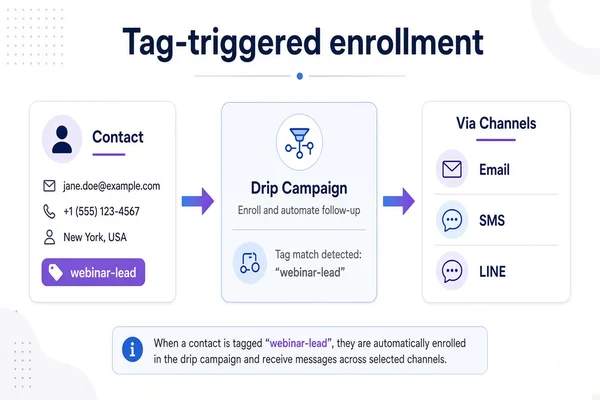
That design beats static lists for three reasons:
- New leads who earn the tag mid-campaign still enter correctly.
- Operators can see, per tag, how many drip activities are listening.
- The same tag can gate email and SMS and messaging-app sequences without duplicating list logic.
Condition-based campaigns exist too (rules that watch behaviour rather than a single tag), but tag triggers remain the clearest mental model for most go-to-market teams. In a tag-first system like Pocket CRM, auto-tagging on funnel form submit is what connects enrollment to the longer nurture.
2. Steps are nodes with a delay clock
Inside a drip campaign, each message is a node: subject or creative, channel payload, sequence order, status, and a delay measured in hours or days relative to the previous step (or to enrollment for the first step).
A simple welcome drip might look like this:
- Email — delay 0 (send in the next daily window)
- SMS reminder — delay 2 days
- LINE or WhatsApp check-in — delay 3 days after the SMS
- Soft offer email — delay 5 days
Two operational details matter more than the copy:
- Daily trigger time. Campaigns often fire once per day at a configured clock time (for example 11:00). That keeps night-owl enrollments from blasting phones at 02:00 and gives operators a predictable send rhythm.
- Reschedule on edit. If you stretch step 2 from 1 day to 4 days while recipients are already queued, the platform must republish a reschedule job. Otherwise half the audience stays on the old calendar.
3. Funnel follow-ups are the first mile; drips are the highway
Funnel pages need something faster than a multi-day drip. On form success (inquiry submitted, order placed, webinar registered), page-level follow-up components can send immediately — email confirmation, SMS with a redeem code, MMS with a QR, LINE Flex, WhatsApp template — each with its own schedule of delays. New to funnel stages? Start with What Is a Marketing Funnel?.
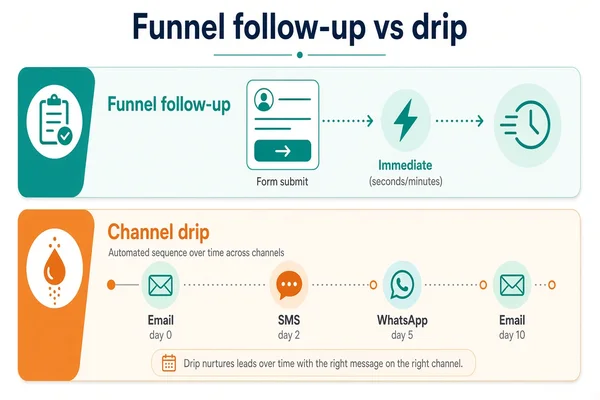
Think of the split this way:
The best funnels do both: an immediate confirmation, then a tag that enrolls the longer nurture. Skipping the immediate layer makes the brand feel silent; skipping the drip layer wastes the lead after day one.
4. Multi-channel is a sequence, not five parallel spam guns
Supporting email, SMS, MMS, LINE and WhatsApp inside one CRM is useless if every channel screams at once. Structure the journey so channels hand off:
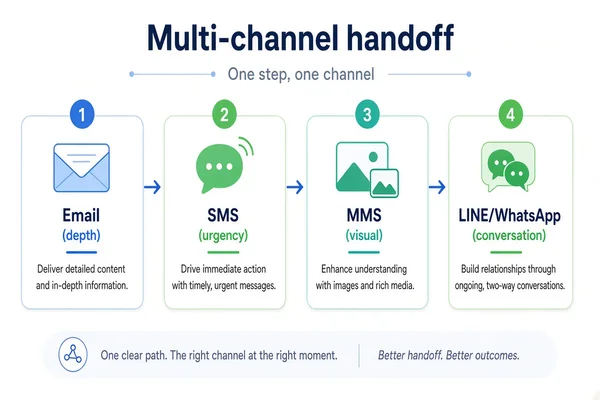
- Email carries depth (proof, comparison, long CTA).
- SMS carries urgency (appointment, OTP-adjacent reminders, short deadlines).
- MMS carries visual proof (receipt, voucher art, event poster).
- LINE / WhatsApp carry conversation and rich cards where those apps dominate the market.
A practical pattern: one channel owns each step. Cross-channel redundancy is fine for critical confirmations; it is noise for nurture.
5. Finishing tags turn drips into a system
When a contact completes a drip (or exits for a business reason), apply finishing tags. Those tags can:
- Unlock the next drip (“attended-webinar” → “sales-sequence”).
- Suppress competing offers.
- Signal the sales team in the CRM.
Without finishing tags, every campaign keeps listening forever and messaging overlaps. With them, the CRM becomes a state machine instead of a megaphone.
6. A checklist before you publish the next drip
- Name the entry tag and who applies it (funnel, import, sales).
- List nodes in order with delay + unit and the channel for each.
- Set the daily send window for human-friendly delivery.
- Define finishing tags and the next campaign they unlock.
- Decide whether editing delays should reschedule already-queued recipients.
- Preview the first mile: does the funnel page already send an immediate follow-up?
Do those six, and drip stops being “three emails on a calendar” and starts being the operating system behind your funnel.
If you are evaluating tools, look for tag-triggered enrollment, per-node delays, multi-channel nodes, funnel follow-ups on submit, finishing tags, and safe reschedule when timing changes. Those are the bones. Creative is the skin.
Related articles
- Event Registration Form: Setup, Reminders & Check-in Guide
- Online Booking Form: What to Collect & How to Cut No-Shows
- Service Booking Automation: Reminders, LINE Follow-Up & Rebooking