
Funnel Marketing
Event Registration Form: Setup, Reminders & Check-in Guide
Published
How to build an event registration form: fields to collect, confirmations and reminders, QR check-in, follow-up, and Google Forms vs a registration system.
Contents
An event registration form lets attendees enter their details, pick a session and sign up online. An event registration system goes further: it controls capacity, sends confirmations and reminders, handles check-in and powers follow-up after the event. For organisers, the registration list isn't just "who's coming" — it's the starting point for your next event and your next sale.
What should an event registration form collect?
Every event is different, but the rule is the same: ask only what you need to run the event and follow up afterwards.
Which messages should go out after someone registers?
No-show rates and attendee satisfaction depend heavily on what happens between sign-up and the event. A typical message timeline:
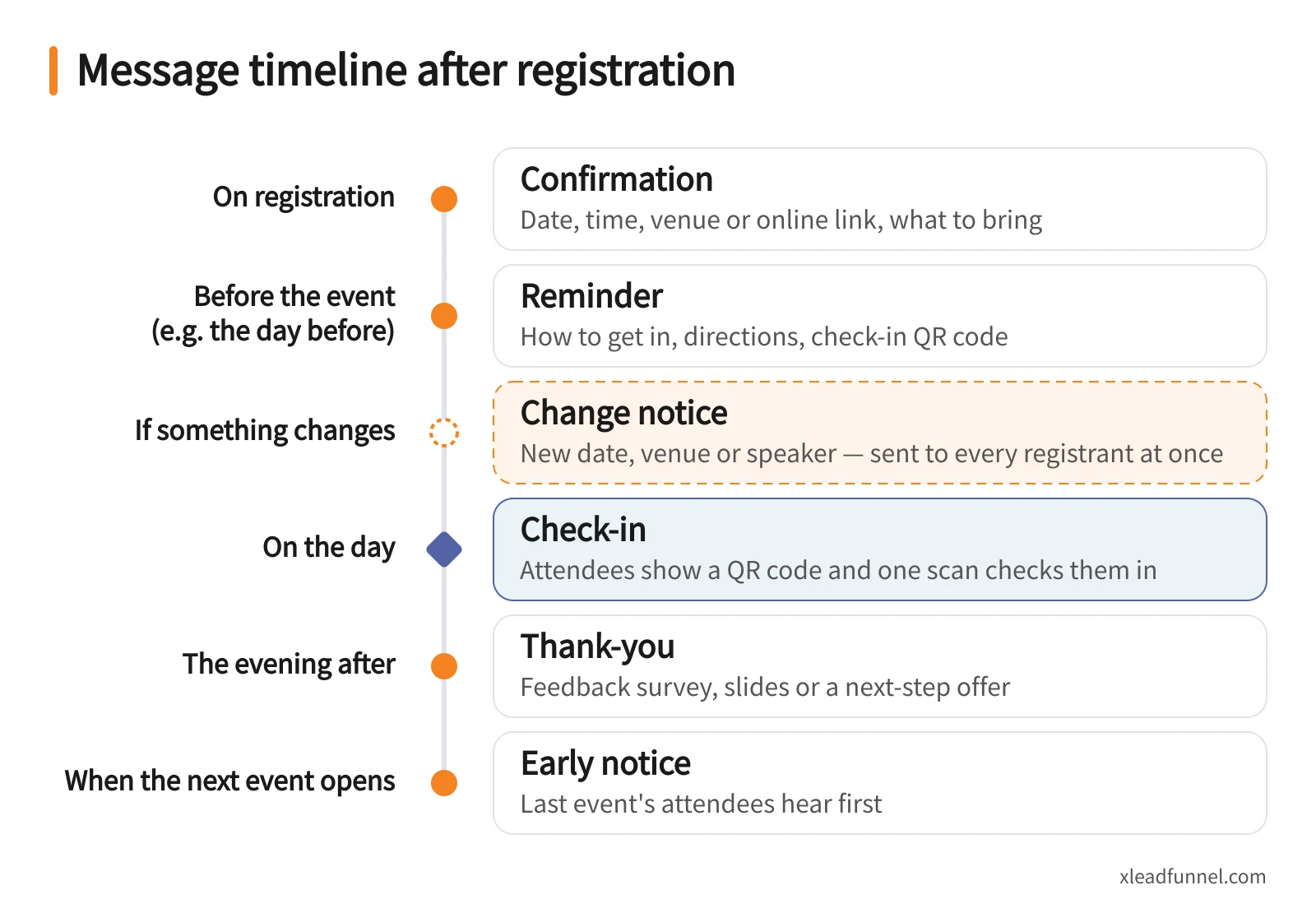
With X Lead Funnel's event sign-up form, confirmations go out the moment someone registers, reminders are sent automatically over LINE or SMS, and last-minute changes reach every registrant in one tap — no messaging people one by one.
Making check-in smooth
Check-in is the first impression of your event. Common practices:
- QR code check-in. Attendees show a QR code and one scan checks them in — X Lead's event flow supports this.
- Put check-in instructions in the reminder. People arrive knowing what to have ready.
- Keep a walk-in option. Someone always brings a friend; a short on-site sign-up keeps their details in your list too.
- Split the queue. For larger events, set up separate check-in points by session or ticket type.
Check-in data matters afterwards, too: you can see how many registered, how many actually came and who didn't — then send the no-shows a quick message.
Turning attendees into leads: 4 follow-up moves
Many organisers stop when the event ends, but that's exactly when your list is warmest.
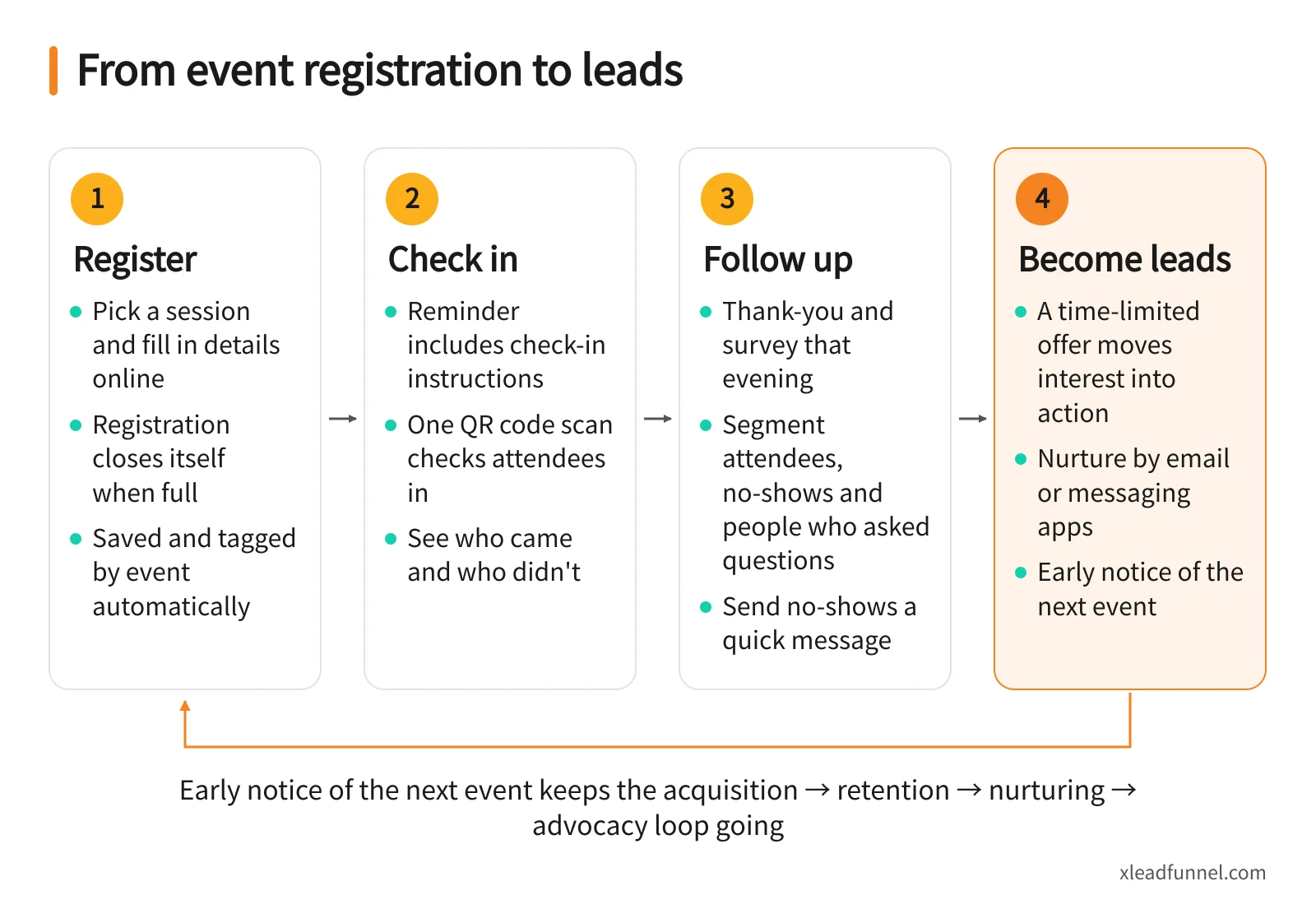
- Tag everyone by event. Each registrant is saved and tagged with the event they joined, so later messages can be targeted.
- Follow up by behaviour. Attendees, no-shows and people who asked questions need different messages.
- Strike while it's warm. Attach a survey or a time-limited offer to that evening's thank-you, moving interest into action.
- Nurture over time. Share useful content by email or messaging apps on a steady rhythm, and give this group early notice of the next event.
That is the acquisition → retention → nurturing → advocacy loop of a full customer journey. For ideas on filling seats, see How to Effortlessly Fill an Event With 100 Registrations.
Google Forms vs an event registration system
Bottom line: Google Forms is fine for a small internal get-together. For public seminars, briefings and workshops — events whose real purpose is meeting more potential customers — a registration system saves a lot of manual work and makes sure the list actually gets used.
Building an event registration form with X Lead Funnel
- Sign up free and pick the Event Sign-up template.
- Set sessions, capacity and opening time. Registration opens on schedule — nobody has to sit on a button.
- Customise fields. Beyond name and phone, add meal choice, company, job title or source as needed.
- Check the automated messages. Confirmation and reminder should state the time, venue and how to get in.
- Publish and share. Post the dedicated link and QR code on social media, in LINE groups or on posters.
- Review the reports afterwards. Compare sources and turnout, then invest more in the channel that worked.
Event registration checklist
Before the event
- Event goal and target audience agreed
- Form fields trimmed, with a privacy consent note
- Sessions, capacity and opening time set
- Confirmation message reviewed
- Reminder timing and entry instructions set
- Link and QR code shared on every channel
On the day
- Check-in method and walk-in sign-up ready
- Change-notice message prepared just in case
After the event
- Thank-you and feedback survey sent that evening
- Follow-up message sent to no-shows
- Segments created by attendance and engagement
- Sources and turnout reviewed to plan the next one
FAQ
Is there a free event registration system?
Yes. X Lead Funnel's free plan includes the event sign-up form, and confirmation and reminder emails sent by the form are included. SMS, LINE and WhatsApp messages use credits; LINE and WhatsApp require integration and are available on subscription plans.
Does it work for webinars and live online classes?
Yes — in-person and online events use the same form. Make email required and include the viewing link in both the confirmation and the reminder.
How can I reduce no-shows?
Confirm instantly, remind people the day before and make entry instructions clear. For free events, note that seats are limited and ask people to let you know if they can't come, so the seat can go to someone else.
How is a seminar registration form different from a regular form?
A seminar registration form has to handle capacity, sessions, reminders and check-in; a regular form just collects data. If you want to keep in touch with your audience afterwards, choose a tool that saves, tags and messages registrants automatically.
Can I use the registration list for marketing afterwards?
Yes, as long as you ask for messaging consent at sign-up. Then segment by event and engagement and send relevant content and next-event notices — it works far better than one blast to everyone. Solopreneurs can find more ideas on the solopreneurs page.
Related articles
- Online Booking Form: What to Collect & How to Cut No-Shows
- From funnel form to follow-up: how multi-channel drip sequences actually work
- Service Booking Automation: Reminders, LINE Follow-Up & Rebooking