
Founder's Mindset
Small Business CRM: How Studios and Solopreneurs Should Choose
Published
How to choose a CRM for a small business, studio or solopreneur: signs you've outgrown spreadsheets, must-have features, 4 CRM types compared, a 6-step setup and consent rules.
Contents
- What is a CRM, and does a small business really need one?
- When should you move from spreadsheets and chat history to a CRM?
- Which CRM features does a small business actually need?
- Which of the 4 types of CRM should you choose?
- How to set up a CRM for a studio in 6 steps
- What do privacy laws require when you market with a CRM?
- FAQ
A CRM (customer relationship management system) keeps every customer's contact details, source, history and tags in one place, and uses them to remind you or follow up automatically. For a studio or a one-person business, a CRM doesn't need to be a heavyweight sales system. If it files new leads automatically, tags them and follows up on time, it will already stop a lot of business from slipping away.
What is a CRM, and does a small business really need one?
Many owners assume a CRM is for companies with sales teams. In practice, small businesses need one more: with fewer hands, every enquiry matters, and it's the busy weeks when replies get forgotten.
A CRM that fits a small business should answer three questions:
- Who is this customer and where did they come from? An Instagram ad, your LINE Official Account or a referral from a friend.
- Where are they now? Just browsing, quoted, paying customer, or a regular who hasn't been back in months.
- What should you say next? And can that step happen automatically?
If "customer temperature" is a new idea, read know your customer's temperature to sell better first, then come back to see how a CRM records it.
When should you move from spreadsheets and chat history to a CRM?
Most small businesses start with customer data scattered across Excel, chat threads, a box of business cards and form replies. That's fine at first, but these signs mean your tools have fallen behind your business:
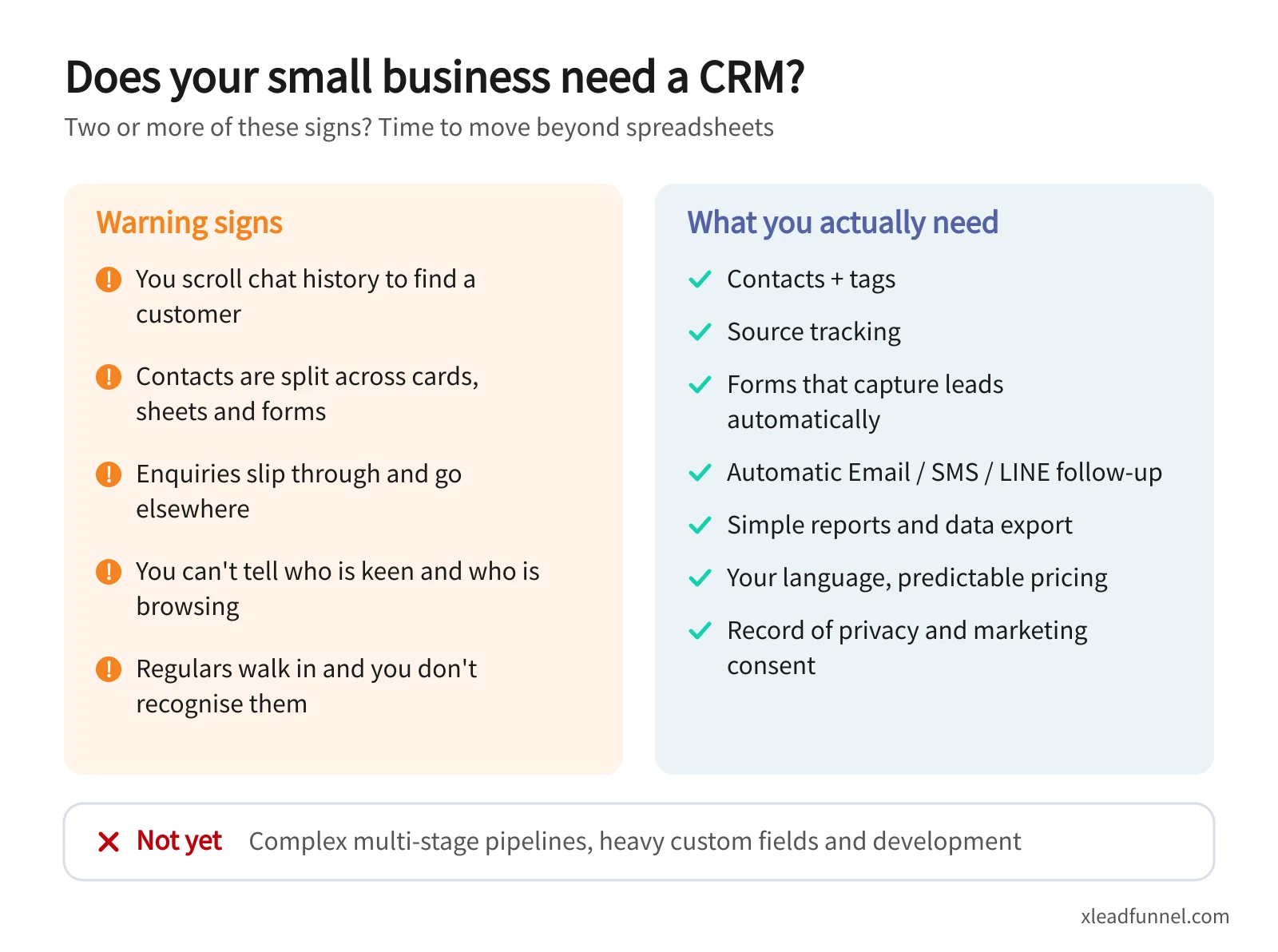
- You scroll chat history to find a customer. Finding last month's quote request means hundreds of messages of scrolling.
- Your data lives in five places. Cards in a drawer, sign-ups in Google Sheets, enquiries in Instagram DMs, and no single list.
- Enquiries slip through. A customer waits, hears nothing, and books someone else.
- You can't tell who is keen. You have 500 contacts but no idea which 30 to call first.
- Regulars go unrecognised. A customer is back for the third time and you can't remember what they bought.
Two or more of these signs means it's time to switch. The earlier your contacts live in one place, the easier every follow-up and remarketing campaign becomes, which is why building a customer list is the best starting point for remarketing.
Which CRM features does a small business actually need?
The most common mistake is being impressed by long feature lists. For studios and solopreneurs, these are the features you'll use every day:
- Contacts and tags to record source, interests and stage, such as "Instagram ad", "group classes" or "customer".
- Source tracking so you know which channels really bring customers, and where ad money should go.
- Forms that capture leads, filing each enquiry, booking or registration automatically with no copy-and-paste.
- Automatic follow-up by Email, SMS or LINE based on tags: a welcome message for new leads, a nudge three days after a quote.
- Simple reports and data export so you can read your monthly numbers and take your data with you.
- Mobile-friendly use, because owners are rarely at a desk.
- An interface in your language, so you and your staff can pick it up without training. In Taiwan and Hong Kong, that means Traditional Chinese.
- Predictable pricing, knowing whether you pay per user, per contact or per message.
- Consent records showing who agreed to receive marketing.
On the other hand, multi-stage sales pipelines, hundreds of custom fields and anything that needs a developer to configure are usually a burden for a small business rather than a help. Revisit them when you hire dedicated salespeople or your deals take months to close.
Which of the 4 types of CRM should you choose?
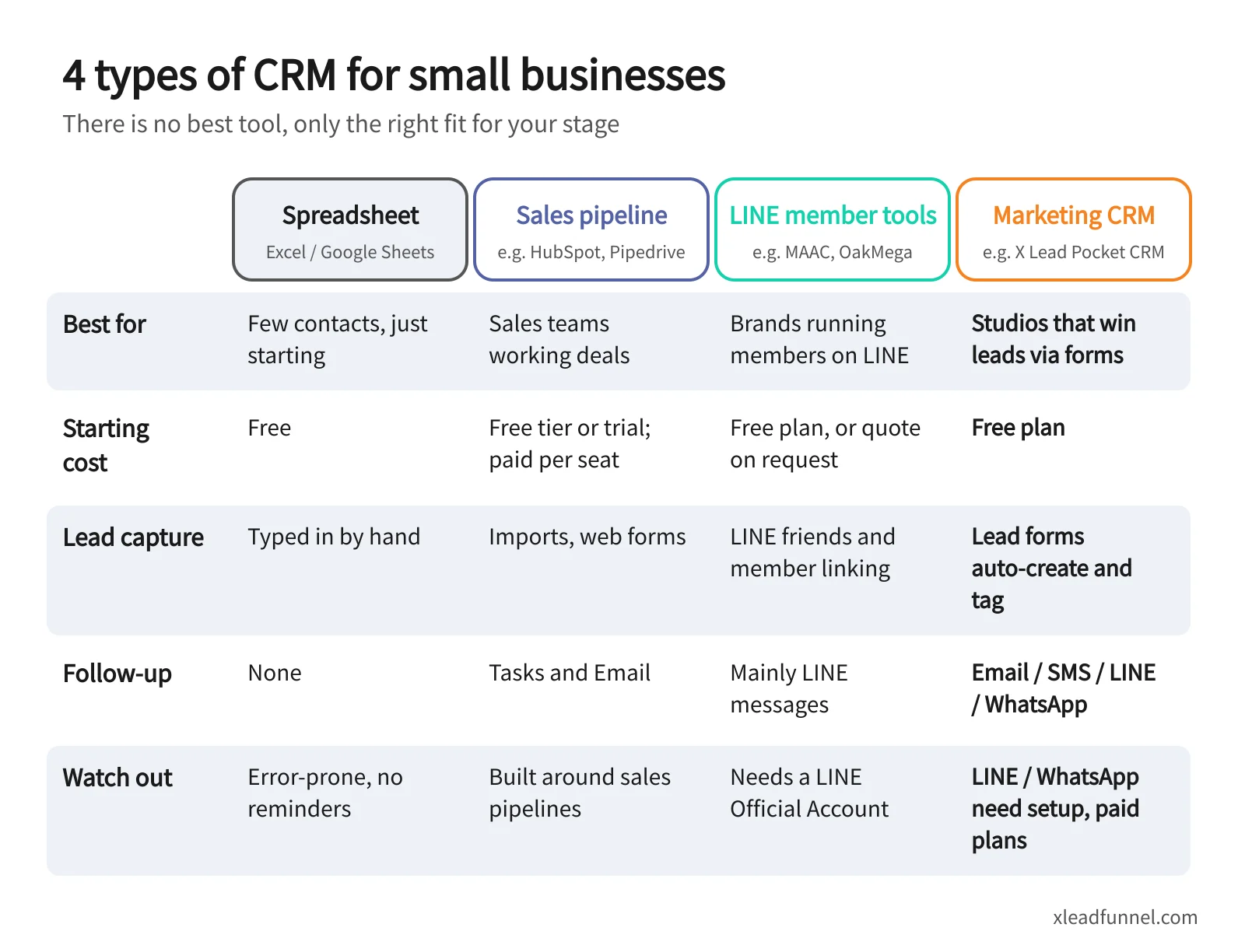
"CRM" covers tools with quite different jobs. This comparison is based on each vendor's website at the time of writing (January 2026); plans change often, so check the official pages.
Spreadsheets: free, but only for the early days
Everyone knows Excel and Google Sheets, and they're fine for under 100 contacts. But they never remind you to follow up, shared editing invites mistakes, and nothing happens automatically when a customer takes an action.
Sales pipeline CRMs: built for sales processes
HubSpot and Pipedrive are mature global products whose strength is moving each deal from first contact to close. According to HubSpot's pricing page, at the time of writing the free CRM covered up to 2 users and 1,000 contacts, paid plans were priced per seat, and the interface is available in Traditional Chinese. Pipedrive has no free-forever plan. It offers a 14-day free trial, charges per seat, and has a Traditional Chinese version. If you sell B2B, handle high-value deals or need to track quotes, they're a strong fit.
LINE member tools: for brands with big LINE audiences
Many Taiwanese brands keep their regulars on LINE. Crescendo Lab's MAAC is an omnichannel marketing automation platform built around LINE that also covers Email, SMS and other channels. It mainly serves mid-size and large brands, with pricing on request. OakMega is a Social CRM that connects to a LINE Official Account, with automatic tagging, member data forms and behaviour tracking. If you already have a large LINE following and want segmented member broadcasts, these tools go deepest on LINE.
Marketing CRMs: for small businesses that grow through forms
These tools put lead capture and follow-up on one platform. Take X Lead Funnel's Pocket CRM as an example. Customers fill in a lead form (general enquiry, booking, offer redemption, event registration, survey and more), and each one becomes a contact tagged by source and answers. Tags then trigger Email or SMS follow-up, and subscription plans can connect LINE and WhatsApp as well. The interface is in Traditional Chinese, pricing is shown in HKD, TWD and USD, and the free plan includes 30 new registrations a month and 200 contacts in total, with no credit card required.
How to decide: if salespeople work deals, choose a sales pipeline CRM. If LINE friends are your main asset, choose a LINE member tool. If most new customers arrive through forms, events and bookings and you want Email, SMS and LINE follow-up in one place, a marketing CRM is simplest. Customers in Taiwan mostly use LINE while Hong Kong leans on WhatsApp, so check that your main channel is supported.
How to set up a CRM for a studio in 6 steps
Take a yoga studio or nail salon as an example. The basics fit into a weekend:
- Import your existing contacts. Merge your spreadsheets into one, standardise the name, mobile and Email columns, remove duplicates, then import.
- Define 5–10 tags. Don't start with 50. Use four groups: source (Instagram, LINE, referral), stage (new lead, quoted, customer, regular), interest (service type) and consent (agreed to marketing).
- Connect your forms. Route enquiry, booking and registration forms into the CRM so every submission is filed and tagged by source, with no more manual entry.
- Set up welcome and follow-up messages. New leads get a welcome message right away, something useful three days later, and a trial offer after a week. For ready-made sequences, see 5 drip follow-up sequence templates.
- Review a report once a week. Spend 15 minutes on new leads, sources and unanswered enquiries, and put your time into the warmest prospects.
- Clean your data regularly. Each quarter, remove duplicates and dead contacts, update tags and respect everyone who has opted out.
Once your list is in order, the next goal is helping customers buy more and stay longer, the subject of 4 keys to moving customers up the value ladder. To see how a full journey fits together, visit customer acquisition and the customer journey.
What do privacy laws require when you market with a CRM?
A CRM makes marketing easier, but collecting and using customer data still has to be lawful. A brief summary, not legal advice:
- Taiwan's Personal Data Protection Act: tell customers why you collect their data and how it will be used. Marketing use should stay within the purpose you collected it for, and going beyond that requires consent. Under Article 20, you must stop marketing as soon as a customer refuses it, and your first marketing message must offer a way to refuse.
- Hong Kong's Personal Data (Privacy) Ordinance: before using personal data for direct marketing, tell customers what kinds of data you'll use and what you'll market, and get their consent. Silence is not consent. When a customer opts out, you must stop using their data for direct marketing immediately and free of charge (see the PCPD's Guidance on Direct Marketing).
In practice, add a clear "I agree to receive marketing messages" checkbox to your forms, include an unsubscribe option in every marketing message, and record consent with a tag. That keeps your marketing both effective and compliant.
FAQ
Is there a free CRM for small businesses?
Yes. HubSpot offers a free CRM with limits on users and contacts, and X Lead Funnel's free plan includes lead forms and Pocket CRM, so a solopreneur can try it with a small list. When comparing free plans, check the contact limit, whether you can export your data, and how pricing works once you upgrade.
Does a one-person business need a CRM?
Yes, and the payoff is often bigger than for a team. When one person handles the work, the marketing and the messages, follow-ups are the first thing to slip. A CRM with automatic follow-up is like an assistant who never clocks off. See more in tools for solopreneurs.
What's the difference between a CRM and an Excel customer list?
A spreadsheet is a static list. A CRM records where each customer came from and what they did, then reminds you or sends messages automatically based on tags. Excel is enough while your list is small, but once enquiries go unanswered or regulars go unrecognised, it's time for a CRM.
How much does a small business CRM cost?
Pricing models vary widely. Sales pipeline CRMs usually charge per user seat, LINE member tools often price by member or contact volume, and marketing CRMs typically price by plan and list size, with messages billed separately. Start with a free plan or trial for a month, then estimate costs from your real contact and message volumes.
Does the CRM interface need to be in my language?
Not strictly, but it matters for a small team. You and your staff use it every day, so an interface in your language (Traditional Chinese for most teams in Taiwan and Hong Kong) makes adoption much easier. Also check that reports, forms and customer-facing messages can be in Traditional Chinese.
Related articles
- Why Personal Branding Matters So Much in the Gig Economy
- How to Choose Marketing Automation Tools for a Small Business
- [Must Read 2026] LINE Official Account Price Hike: Cut Costs